Key Takeaways:
- AI humanizers and AI rewriters are not interchangeable. A rewriter improves your writing. A humanizer transforms AI-generated writing into something that reads as human-authored.
- The right tool depends on what you're starting with. Use a humanizer first if you want to make AI-generated text sound human. Use AI rewriter if you need to polish your draft.
- Using a rewriter on AI-generated text is one of the most common mistakes students make.
Rewriters improve clarity and grammar. Humanizers uniform sentence rhythm, predictable word choices that AI detectors analyze.
An AI humanizer transforms AI-generated text into natural, human-sounding writing by addressing tone, rhythm, and the statistical patterns that AI detectors flag. An AI rewriter improves clarity, structure, and grammar on text that already exists. They solve different problems — and using the wrong one for your situation produces results that don't hold up.
What Is an AI Humanizer?
An AI humanizer is a tool that takes text that reads as machine-generated and rewrites it to sound like it was written by a person. It doesn't just swap words; it addresses the deeper structural patterns that identify text as AI-generated in the first place.
Here's how an AI humanizer works and what it does:
- Varies sentence length and rhythm to break the uniformity that AI models produce
- Replaces formal connectors ("Moreover," "Furthermore," "In addition") with natural transitions
- Adjusts tone to match how a person actually writes rather than how a language model statistically predicts text
- Removes the "too perfect" quality of AI prose — the consistent grammar, balanced structures, and absence of natural irregularity
The result isn't just different words. It's text that carries the markers of human authorship — imperfections, varied rhythm, natural voice — that both readers and AI detectors associate with human writing.
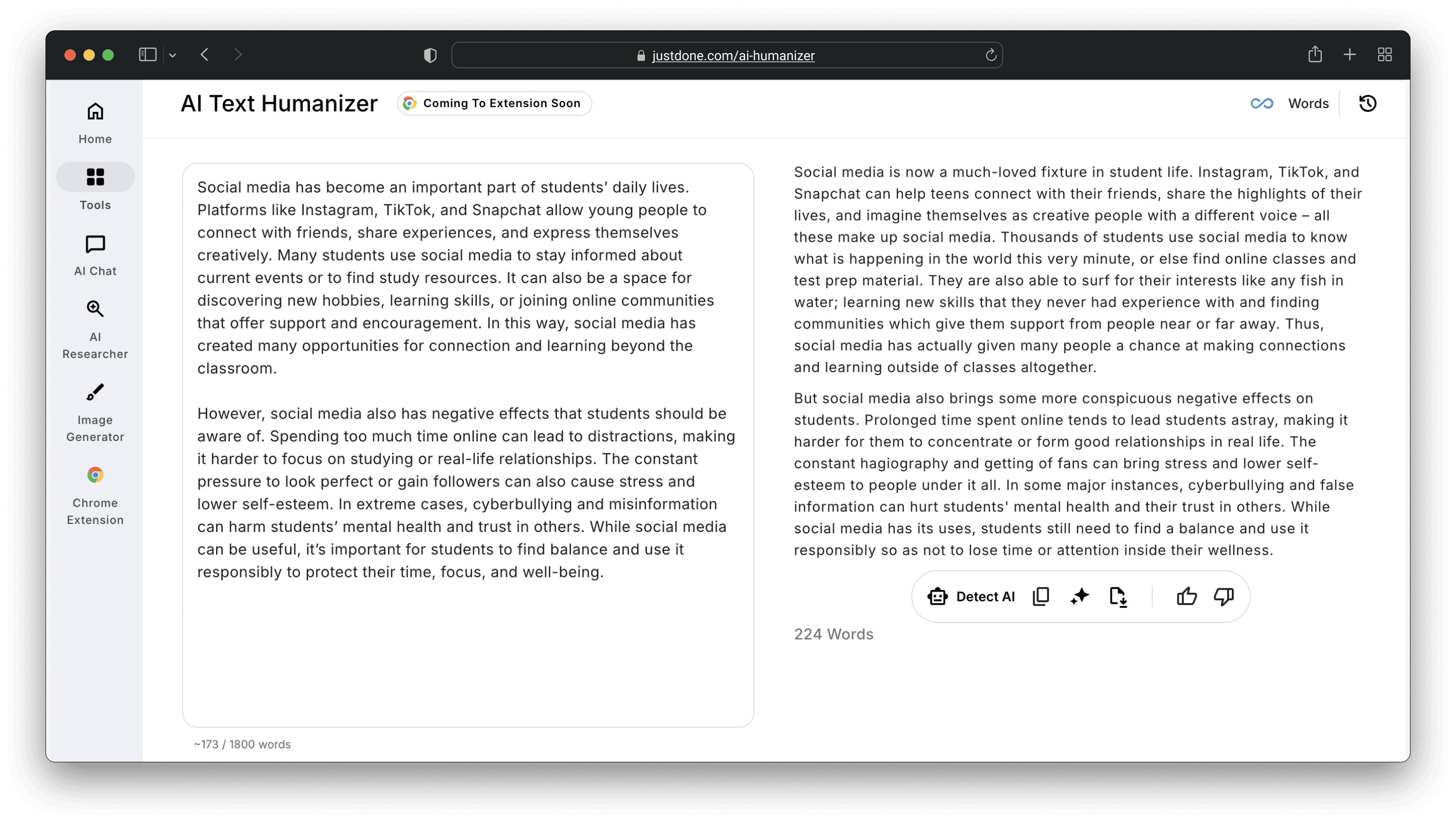
Here’s what JustDone AI Humanizer output looks like with the following GPT-generated text:
When to use an AI humanizer:
- You have AI-generated text that needs to read as human-written
- Your writing has been flagged by an AI detector and you need to humanize AI content
- You're incorporating AI-assisted content into academic or professional work and need it to sound like you
- Your writing sounds too formal, too uniform, or too "clean" for the context
What Is an AI Rewriter?
An AI rewriter is a tool that improves text you've already written. It focuses on clarity, structure, grammar, and flow, making existing writing better without fundamentally changing its nature or authorship.
A good AI rewriter:
- Fixes grammatical errors and awkward phrasing
- Restructures sentences that are unclear or hard to follow
- Improves the logical flow between ideas
- Adjusts vocabulary for precision and readability
- Tightens verbose or redundant passages
The key distinction: a rewriter works on the quality of writing, not on its origin. It doesn't transform AI-generated text into human-sounding text, but makes existing text clearer and more polished.
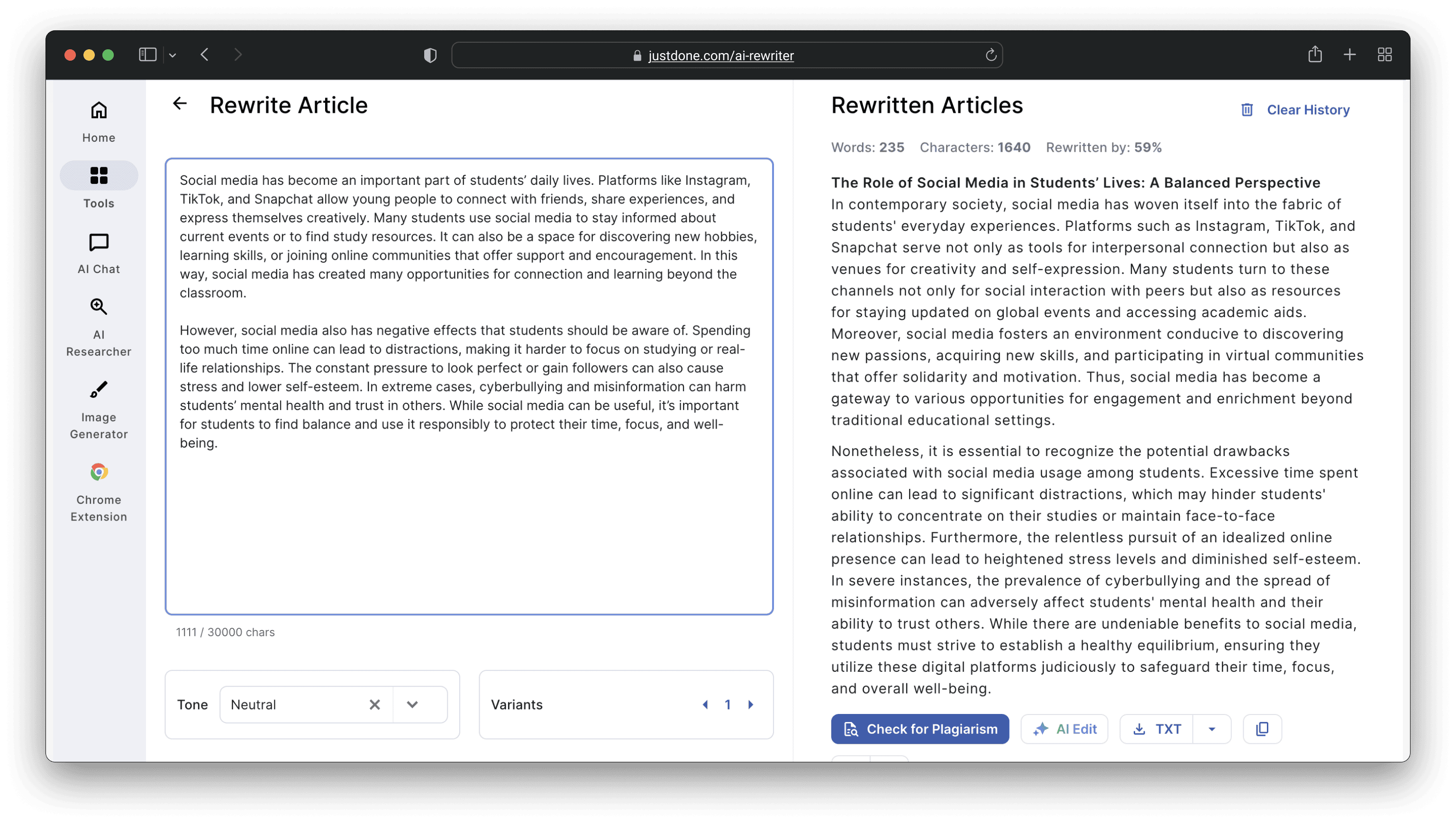
Let’s rewrite a piece from a student's essay about social media. Here’s what it looks like after JustDone's AI Rewriter:
When to use an AI rewriter:
- You've written something yourself but it doesn't read well yet
- A sentence or paragraph is grammatically correct but awkward
- Your draft is clear in meaning but needs structural improvement
- You want to tighten verbose writing without changing its content
AI Humanizer vs AI Rewriter: Side-by-Side Comparison
Here's a visual comparison of AI humanizer and AI rewriter:
| Feature | AI Humanizer | AI Rewriter |
|---|---|---|
| Primary purpose | Transform AI text into human-sounding writing | Improve clarity and structure of existing text |
| Addresses AI detection patterns | Yes | No |
| Bypasses AI detectors | Yes | Rarely |
| Improves grammar | Yes | Yes |
| Changes sentence rhythm | Yes, fundamentally | Partially |
| Maintains original meaning | Yes | Yes |
| Changes writing structure | Yes | Yes |
| Best starting point | AI-generated text | Human-written rough draft |
| Tone transformation | Yes, core function | Partially |
| Ideal for academic use | Yes | Yes |
The Core Difference: What Each Tool Actually Changes
This is where most students and writers get confused.
A rewriter operates on the surface of your text. It looks at what you've written and makes it better — clearer, more grammatically correct, better structured. It assumes the text is human-written and treats it accordingly.
A humanizer operates on the nature of your text. It analyzes whether the writing carries the statistical signatures of AI output — the patterns in word choice, sentence rhythm, and structural consistency that AI detectors flag. Rewrites remove those signatures.
The practical implication: running AI-generated text through a rewriter produces cleaner AI-generated text. The grammar improves and the structure gets better. But the underlying patterns that identify it as machine-generated remain, because the rewriter isn't designed to address them.
Running AI-generated text through a humanizer produces text that reads differently at a structural level — varied, irregular, and natural in the ways that human writing is.
How to Use AI Humanizer and AI Rewriter Together
The most effective workflow combines both tools in the right sequence.
If you're starting from AI-generated text:
- Run the text through JustDone's AI Humanizer first — this addresses the structural patterns that make it sound AI-generated
- Run the humanized output through JustDone's AI Detector to see which sentences still register as AI-like
- Use the AI Rewriter to polish clarity, structure, and any remaining awkward phrasing
Rescan with the AI Detector to confirm the result reads as human-written
If you're starting from your own rough draft:
- Use the AI Rewriter to improve clarity, fix grammar, and tighten structure
- If the rewritten version reads as too polished or formal, run it through the AI Humanizer to reintroduce natural variation
- Verify with the AI Detector before submitting
If your writing has been flagged by an AI detector:
- Check the sentence-level breakdown to see which specific sections triggered the flag
- Run those sections through the AI Humanizer
- Rewrite the humanized output in your own voice to add natural variation
- Rescan to confirm
JustDone gives you access to all three tools — AI Humanizer, AI Rewriter, and AI Detector — in the same workspace, so you can run the same passage through multiple tools and compare outputs without switching platforms.
Why Learners Often Use the Wrong Tool
The most common mistake is to use a rewriter to try to bypass AI detection.
It makes intuitive sense. If the problem is that your text sounds like AI, and a rewriter changes your text, then the rewriter should fix the problem. But it doesn't work that way.
AI detectors don't flag your text because the grammar is wrong or the structure is unclear. They flag it because the sentence rhythm is too uniform, the word choices are too predictable, and the overall pattern too consistent. A rewriter addresses the first set of problems. It leaves the second set entirely intact.
The other common mistake: humanizing text when you actually need to rewrite it. If your own rough draft is unclear or poorly structured, a humanizer will make it sound natural — but it won't necessarily make it logical or well-argued. Humanization and editing are different tasks.
Real-World Scenarios
Scenario 1: You used ChatGPT to draft an essay introduction
The draft covers the right points but reads uniformly and formally. Run it through JustDone's AI Humanizer. The rhythm varies, the tone softens, and the result sounds like someone actually wrote it. Then use the Rewriter to tighten any sentences that are still awkward. Check with the AI Detector before submitting.
Scenario 2: You wrote your own conclusion but it sounds clunky
The ideas are yours, but the phrasing doesn't flow. Use the AI Rewriter — it will improve clarity and structure without transforming the fundamental nature of your writing. No need for the Humanizer here because the text is already human-authored.
Scenario 3: Your submission came back with an AI flag
Don't run it through a rewriter. Open JustDone's AI Detector, identify the flagged sentences, and run those specific sections through the AI Humanizer. Revise the output in your own voice, then rescan.
Scenario 4: You have AI-generated research notes you want to incorporate into a paper
Start with the Humanizer to transform the AI output into natural-sounding prose. Then use the Rewriter to integrate the style with the rest of your paper. Verify with the AI Detector.
Frequently Asked Questions
What is the difference between an AI humanizer and an AI rewriter?
An AI humanizer transforms AI-generated text into writing that sounds human-authored — addressing tone, rhythm, and the statistical patterns that AI detectors flag. An AI rewriter improves clarity, grammar, and structure of text that already exists. They target different problems and work best in sequence rather than as substitutes for each other.
Can an AI rewriter bypass AI detection?
Not reliably. AI rewriters improve surface-level quality — grammar, clarity, structure — but don't address the deeper patterns that AI detectors analyze. Running AI-generated text through a rewriter produces cleaner AI-generated text, not human-sounding text.
Does an AI humanizer change the meaning of my text?
No. A well-designed AI humanizer preserves your original meaning while changing the structural patterns that make the text sound AI-generated. JustDone's AI Humanizer is specifically designed to maintain content accuracy while transforming how the text reads.
Should I humanize or rewrite first?
If you're working with AI-generated text, humanize first. The humanizer addresses the fundamental nature of the text, and the rewriter then polishes the humanized output. If you're working with your own writing, rewrite first — and only humanize if the result reads as too polished or formal.
Can I use both tools on the same text?
Yes, and that's often the most effective approach. Humanize AI text first to address detection patterns, then rewrite to improve clarity and structure. JustDone gives you access to both tools in the same workspace so you can compare outputs and run text through multiple tools without switching platforms.
What makes AI text sound robotic?
Uniform sentence rhythm, predictable word choices, consistent grammatical structure, overuse of formal connectors ("Moreover," "Furthermore"), and absence of the natural variation that characterizes human writing. These are structural patterns — not surface vocabulary problems — which is why rewriters alone don't fix them.
Is humanizing AI text considered cheating?
Humanizing AI text is a writing process tool, similar to editing or using a grammar checker. Whether AI use is permitted depends on your institution's specific policies. Using JustDone's AI Humanizer to ensure your writing sounds natural and passes detection checks is appropriate when AI assistance is allowed under your institution's guidelines. Always check your institution's AI policy before using any AI tool in academic work.
AI Rewriter vs AI Humanizer: Conclusion
AI humanizers and AI rewriters are complementary tools that solve different problems. Humanizers address the fundamental nature of AI-generated text — the structural patterns that make it detectable and unnatural. Rewriters address the quality of existing text — clarity, grammar, and structure.
Using a rewriter on AI-generated text is one of the most common and consequential mistakes students make. It improves the surface without addressing what actually triggers detection.
The most reliable workflow: humanize AI-generated text first, verify with an AI detector, and then rewrite to polish. JustDone gives you all three tools in the same workspace, so the sequence takes minutes rather than hours across multiple platforms.
