You have just finished a paper, and you are wondering whether it will get flagged. Maybe you paraphrased something heavily, or you are not sure whether your citations are complete. Before you submit, it helps to understand what these tools actually do. Knowing how much plagiarism is acceptable starts with knowing how the detection works in the first place. This guide explains it without the technical jargon.
How Is Plagiarism Detected? The Core Process
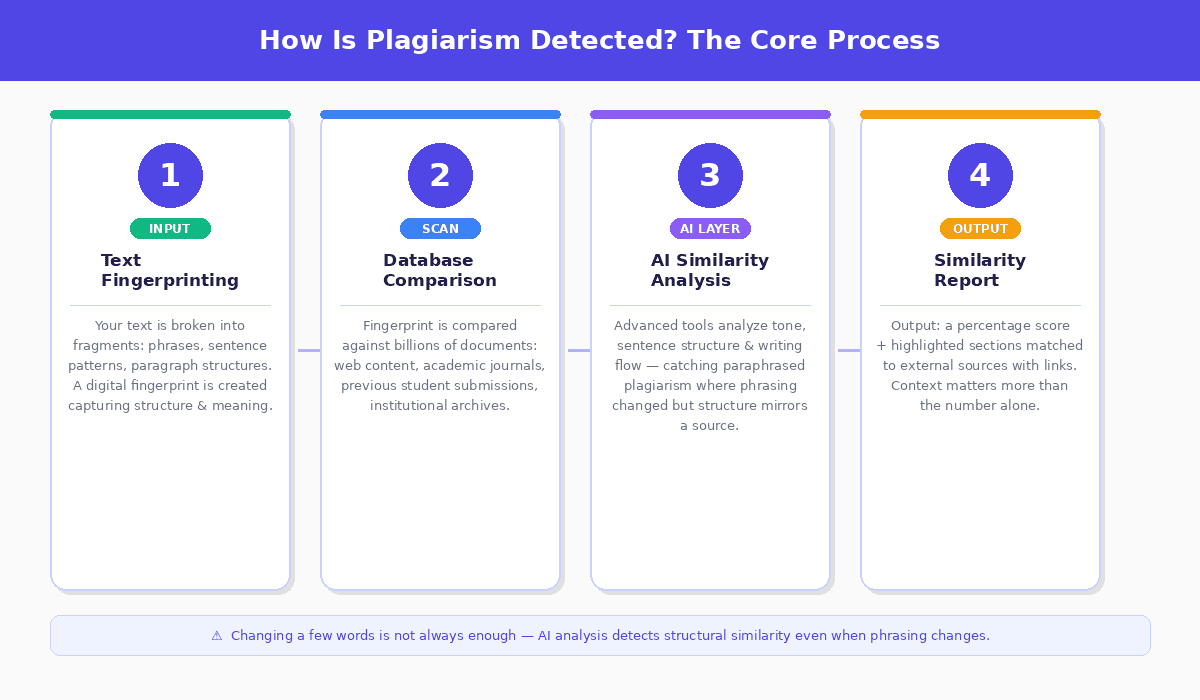
Plagiarism detection works in four stages. Understanding each one tells you what checkers actually look for and why changing a few words is not always enough.
Step 1: Text fingerprinting
When you paste text into a plagiarism checker, the tool breaks your writing into fragments. These might be phrases, sentence patterns, or paragraph structures. From these fragments, the software creates a digital fingerprint — a unique representation of your content that captures not just the words but how the ideas are arranged.
Step 2: Database comparison
Your fingerprint is then compared against a large database of existing content. Depending on the tool, this database includes:
- Public web content, including blogs, news articles, and Wikipedia
- Academic journals and research papers
- Previously submitted student work
- Institutional archives and course materials
This is where different tools diverge significantly. Free checkers typically only scan public websites. Tools used by universities, including Turnitin and SafeAssign, compare your work against private student submission databases, which means recycling a paper from a previous course can get flagged even if it never appeared online.
Step 3: AI-powered similarity analysis
More advanced tools go beyond word-for-word matching. They analyze tone, sentence structure, and writing flow. This allows them to catch paraphrased plagiarism — cases where the phrasing has changed but the structure closely mirrors a source. JustDone's plagiarism detection uses this approach, which is why it catches overlaps that basic checkers miss entirely.
Step 4: Similarity report
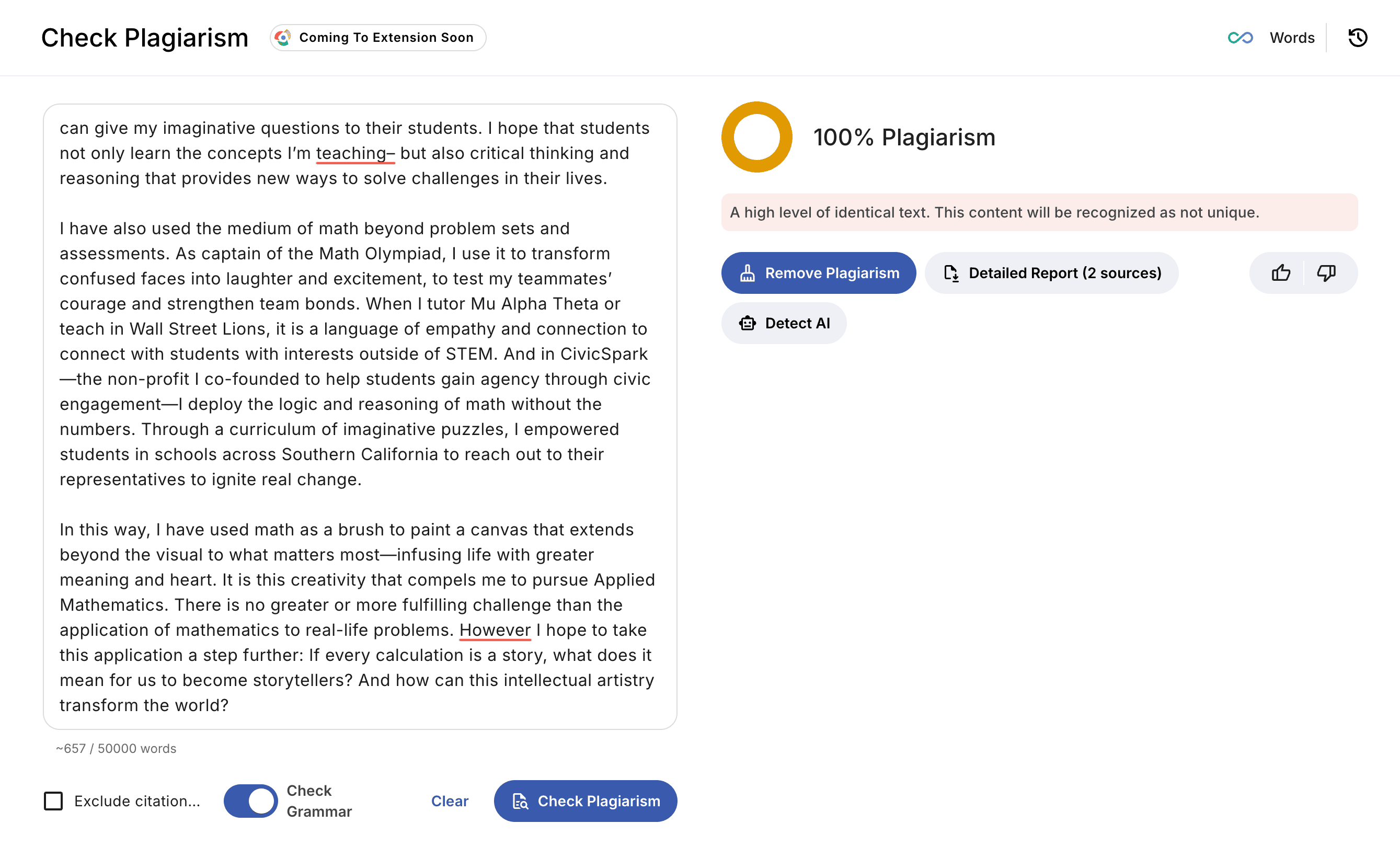
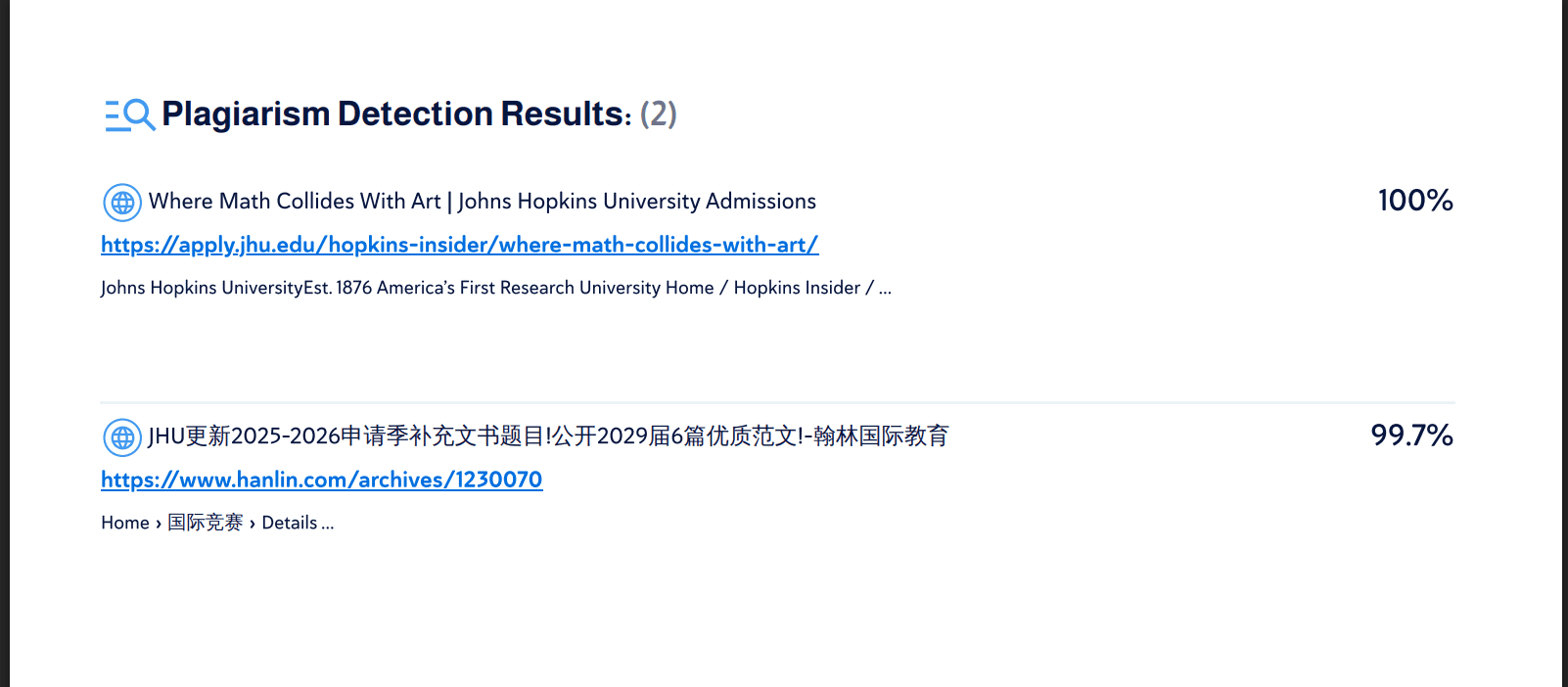
The output is a similarity report showing a percentage score and highlighted sections matched to external sources, with links to the original content where available. The percentage reflects how much of your text overlaps with existing sources, but context matters more than the number itself, which is covered below.
What the Similarity Percentage Actually Means
A similarity score is a signal, not a verdict. Here is how to read it:
Under 10% — Generally acceptable. Most of this will be common phrases, properly cited quotes, or generic academic language that appears across many documents.
10 to 20% — Worth reviewing. Look at what was flagged. If it is all properly cited material, you are likely fine. If sections lack attribution, add citations before submitting.
Over 25% — Needs attention. Even if all your sources are cited, large blocks of similarity can raise concerns. Review flagged sections and improve paraphrasing where needed.
The number means less than what is driving it. A 20% score built entirely from correctly cited quotes is not a problem. A 7% score with one poorly paraphrased paragraph and no citation is. Always look at the highlighted content, not just the headline figure.
How Different Tools Compare
Not all plagiarism checkers for school and professional use work the same way.
Basic free checkers compare your text against publicly available web content only. They catch direct copying from websites but miss academic sources and student submissions entirely. Useful for a quick surface check, not reliable for academic submission.
Institutional tools (Turnitin, SafeAssign) compare your work against web content, academic databases, and a global repository of previously submitted student papers. Once a paper enters the system, it becomes part of the comparison pool. This is why self-plagiarism — reusing your own previous work without disclosure — gets caught.
AI tools (like JustDone) combine traditional text matching with AI analysis of structure, tone, and flow. This makes them more effective at catching paraphrased plagiarism where the words have changed, but the underlying content closely mirrors a source.
For a full comparison of available options, see JustDone's guide to the best plagiarism checkers available for students in 2026.
Plagiarism Checkers and AI-Generated Content
One thing worth understanding: traditional plagiarism checkers are not designed to detect AI-generated content. AI-generated text does not match existing sources in a database because it was generated fresh rather than copied from anywhere. A clean similarity score does not confirm that content is original; it only confirms it does not match existing sources.
For AI-generated content, a separate AI detector is needed. It analyzes different signals — sentence rhythm, word predictability, structural uniformity — rather than database matches. If you have used AI tools at any stage of your writing process, running an AI detection check alongside a plagiarism check gives you a complete picture before submission.
How to Use a Plagiarism Checker Effectively
Most students check for plagiarism once, right before submitting. A more effective approach, approved by academia, is to check earlier and more often.
- Run a check mid-draft when you are roughly halfway through. This catches paraphrasing issues while you still have time to rework sections without deadline pressure. It also shows which areas of your argument rely heavily on external sources and may need more of your own analysis. Here's what a plagiarism report from JustDone looks like:
- When you get your report, work through the flagged sections one by one. For each highlighted passage, ask whether it is properly cited, whether the paraphrase is close enough to need quotation marks, and whether the idea is clear enough to be rewritten more distinctly.
- Keep your sources open while you revise. Comparing your text directly to the source as you edit is faster and more accurate than trying to remember what each source said. A citation creator helps you format references correctly as you go, which prevents the citation errors that often appear in similarity reports.
Frequently Asked Questions
How do schools check for plagiarism?
Most universities use platforms like Turnitin or Blackboard's SafeAssign, which are integrated directly into their learning management systems. These platforms compare submissions against web content, academic databases, and a repository of previously submitted student work from institutions worldwide. Instructors see the full report.
Do plagiarism checkers work?
Yes, plagiarism checkers are effective at finding direct copying, close paraphrasing, and content that closely matches sources in their database. However, they are not perfect. They can miss heavily rewritten content, sources outside their database, and AI-generated text unless AI detection is included. Using both plagiarism and AI detection tools gives you a more complete review of your work before submission.
How accurate are plagiarism checkers?
Plagiarism checkers are highly effective and can also identify many forms of paraphrasing and structural similarities between texts. However, no tool is 100% accurate. Results depend on the size and quality of the database being scanned, and some heavily rewritten or unpublished content may go undetected.
