Key Takeaways:
- GPTZero detects AI content reasonably well, but not perfectly. The stated accuracy rate is 85% for AI content, meaning roughly 1 in 7 AI texts may go undetected.
- False positives are a real risk for students. GPTZero doesn't always handle this well, which matters if you're a student using it to check your own work.
- GPTZero tells you there's a problem. JustDone helps you fix it with the built-in AI Humanizer.
GPTZero is a legitimate AI detection tool with solid accuracy on English text, useful features for educators, and a workable free tier. It's not the most accurate detector available, and it struggles with non-English content and formal academic writing that can trigger false positives. Worth using as a first-pass tool, not as a definitive verdict.
What Is GPTZero?
GPTZero is an AI detection tool built to identify whether a piece of text was written by a human or generated by AI models like ChatGPT, Claude, Gemini, or GPT-4. It was created by Edward Tian, a Princeton student, and has grown into one of the more widely used detection tools — particularly in educational settings.
The core idea is simple: paste in your text, run a scan, and get a probability score telling you how likely it is that the content was AI-generated. GPTZero originally relied on two technical metrics — perplexity and burstiness — to measure how predictable and uniform the language was. More predictable, more uniform text is typically a sign of AI. The tool has since moved toward a simpler percentage-based output that most users find easier to read.
How GPTZero Works
GPTZero originally used two technical metrics to evaluate text:
Perplexity measures how predictable the language is. AI models tend to choose statistically likely words — human writers are less predictable. Lower perplexity suggests AI.
Burstiness measures variation in sentence complexity. Humans tend to mix long and short sentences naturally. AI output tends to be more uniform. Lower burstiness suggests AI.
GPTZero has since moved toward a simpler percentage-based output — a score showing the probability that text is AI-generated — after users found the perplexity and burstiness model confusing. The underlying logic is the same, but the interface is now more accessible.
For the Advanced Scan, GPTZero adds sentence-level analysis, vocabulary pattern flagging, and a newer paraphrasing detection feature that identifies text that was originally AI-generated but has since been rewritten.
How We Tested GPTZero
We ran multiple tests to check the AI detection capabilities of GPTZero. First, we compared two versions of the same text – AI-generated and mixed – to see how it handled different scenarios.
Test 1: Pure AI-generated text
We started with a text written entirely by ChatGPT — an essay on the benefits and drawbacks of electric vehicles. We did no human editing, no rewrites, just put it straight from the model. We ran it through GPTZero's basic scan.
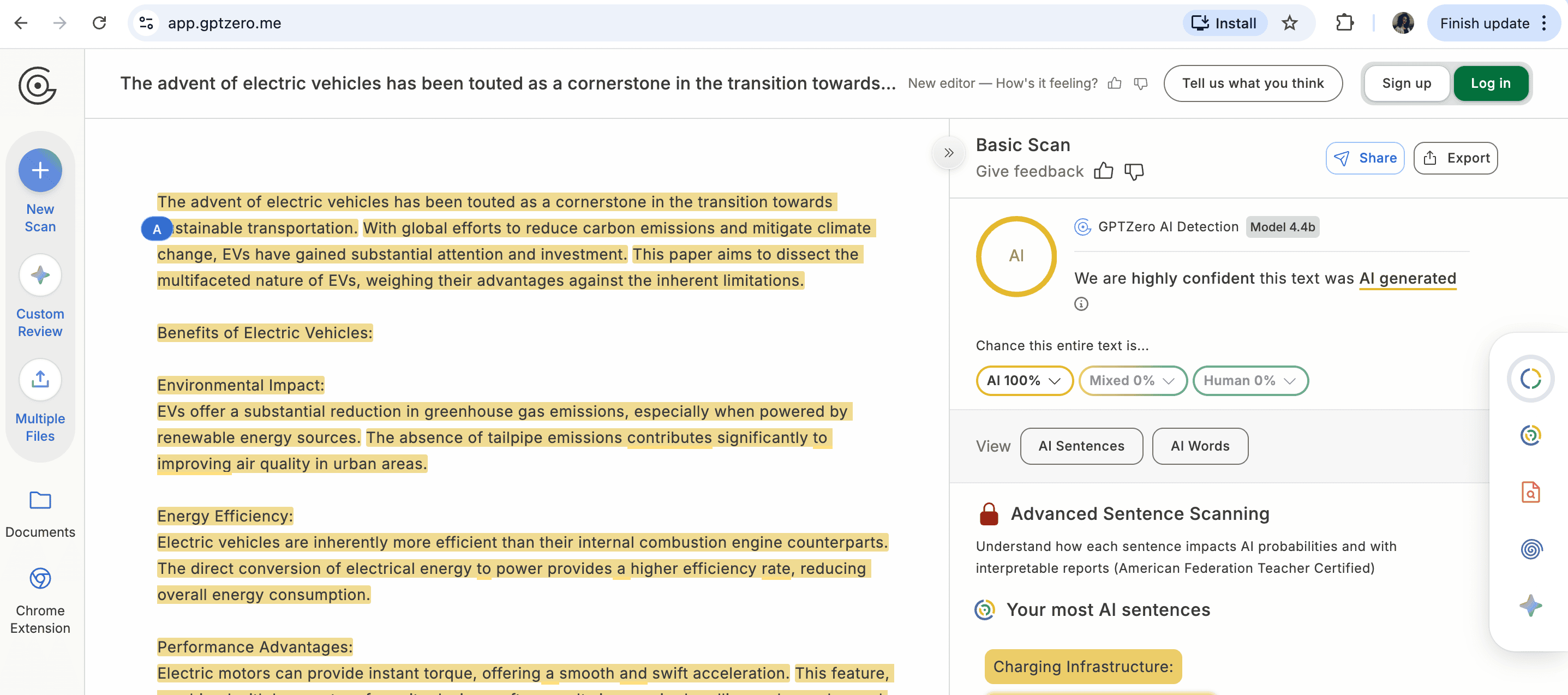
The result was fair enough, as the tool showed that the text was 100% generated.
Test 2: The same text after humanization
We then took that same AI-generated essay and rewrote it in a more natural, conversational style. It was the kind of light human editing that students and writers often do to clean up AI output. We ran it through GPTZero's Advanced Scan.
The result: "Possible AI Paraphrasing — We are highly confident this text was originally AI, but rewritten by AI or a human." AI probability: 100%.
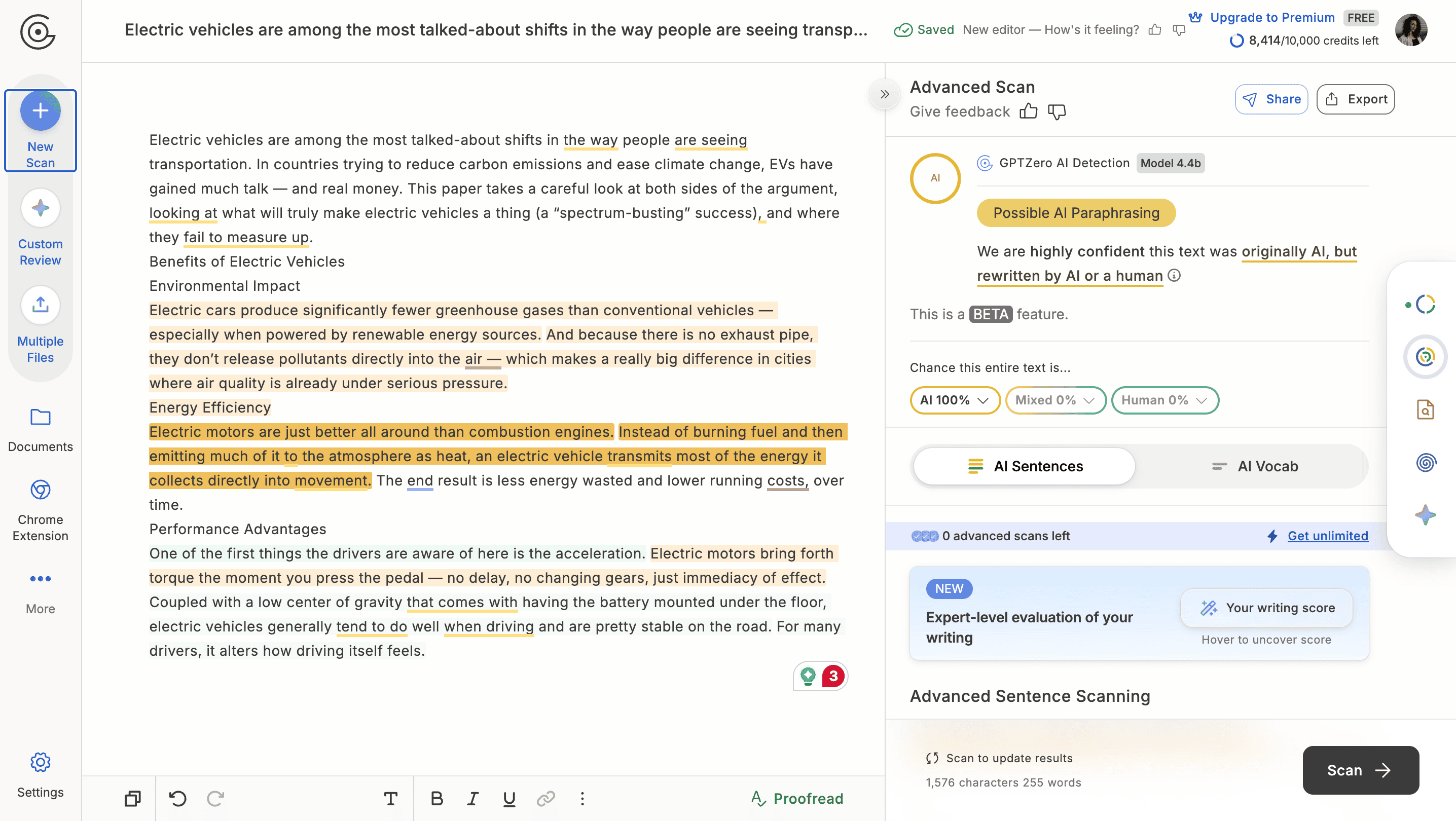
This is actually a meaningful result. GPTZero correctly identified that the text had been reworked but was still originally AI. The "Possible AI Paraphrasing" label is a beta feature, and it's genuinely useful — it doesn't just give you a binary answer, it tells you the nature of what it found.
However, the tool showed 0% mixed text, although it was not 100% AI-generated after editing.
Test 3. Multilingual support
We tested several texts in other languages except English. GPTZero doesn’t always demonstrate accurate results.
To test false-positive results in Spanish, we generated an introduction to this text in Spanish through ChatGPT.
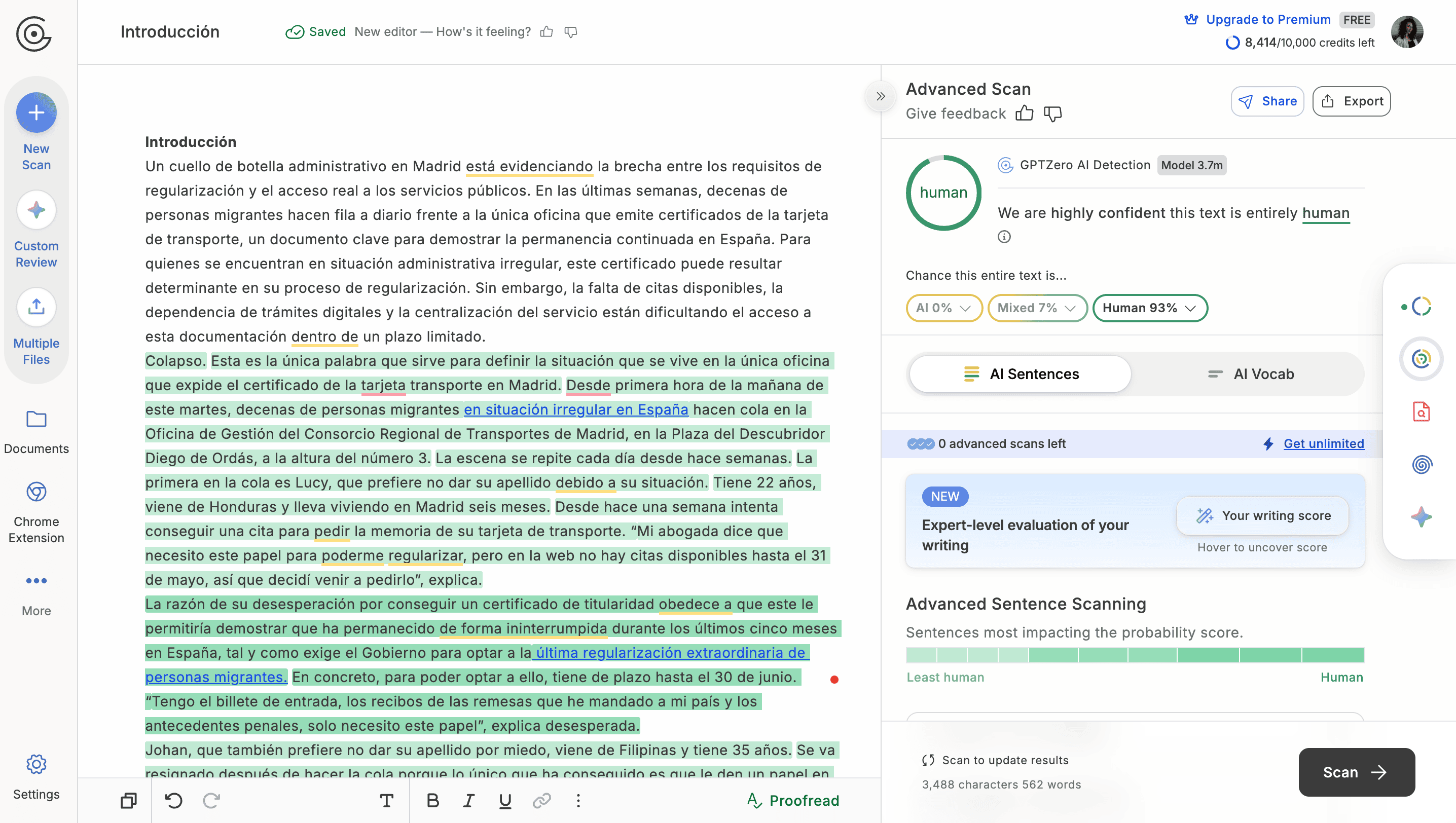 The tool identified the result as mixed content, while Intro was fully AI-generated.
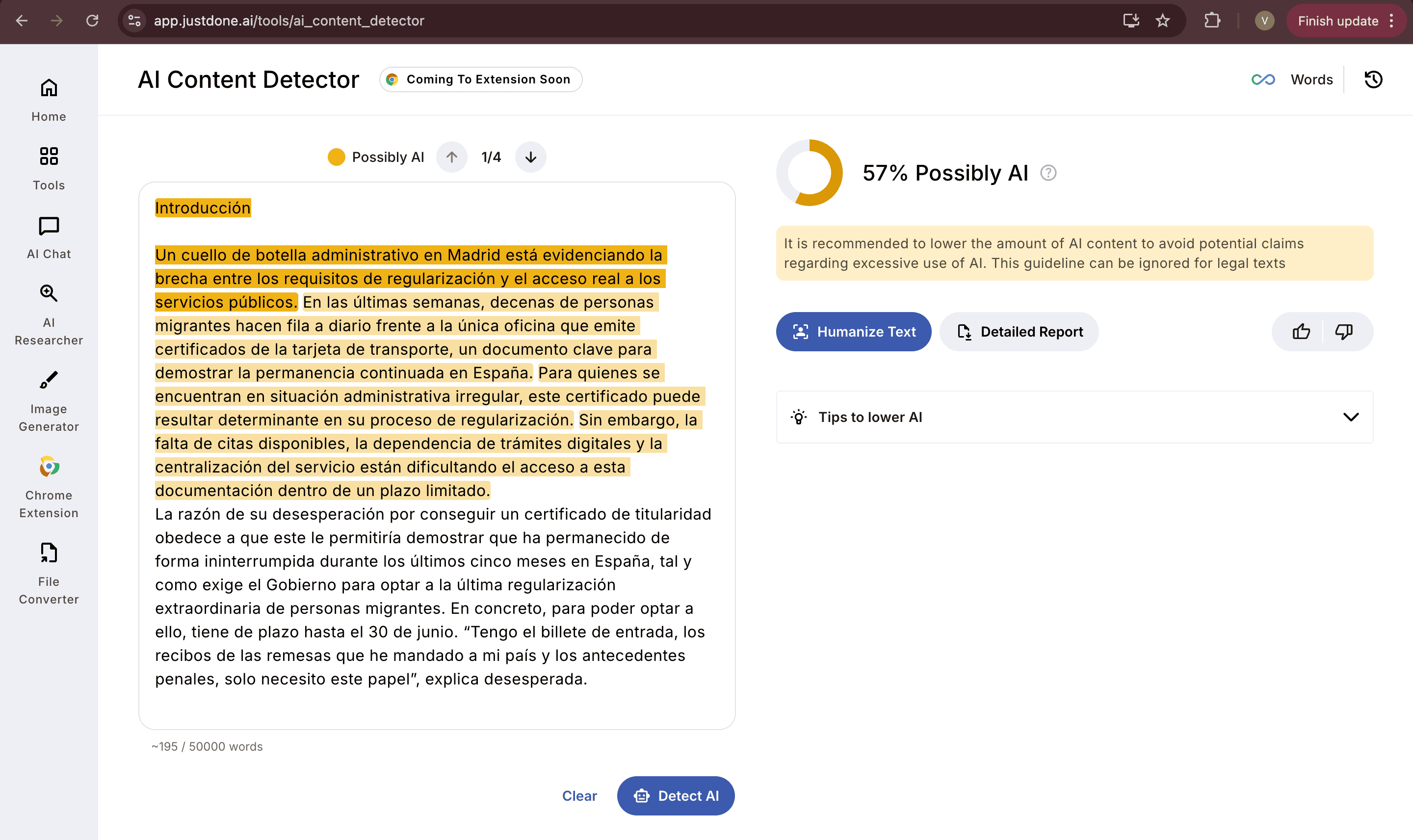
For example, that's the output of AI detection by JustDone that correctly flagged the AI-generated part and gives a fair AI score.
Accuracy: What Does GPTZero Claim vs. What Does It Deliver?
GPTZero states on its website that they correctly classify human-generated text 99% of the time and AI content 85% of the time. These are solid headline numbers, but they come with caveats.
The 85% AI detection rate means roughly 1 in 7 AI texts gets through undetected. For educators using this as a first-pass tool, that's workable. For anyone relying on it as a definitive verdict, it isn't one.
More importantly, the false positive question matters a lot to students. Formal academic writing — structured arguments, technical vocabulary, consistent tone — can look a lot like AI-generated text to a pattern-matching algorithm. GPTZero doesn't always handle this well. A well-written essay by a careful student can trigger an AI flag, which creates a real problem.
Independent research by Scribbr, which tested multiple AI detectors, found GPTZero to be less accurate than some alternatives. It performed better than many free tools but fell short of top-tier options in direct comparisons.
From our own testing of GPTZero and the best AI detectors, the Advanced Scan performed noticeably better than the Basic Scan — the paraphrasing detection in particular was a pleasant surprise. But the basic free tier leaves a lot to be desired.
GPTZero Features
Here are a set of major features which GPTZero provides for its users:
Basic and Advanced Scan
The core product. Basic scan gives you an overall AI probability score. Advanced scan breaks it down further with sentence-level analysis, vocabulary flagging, and the new paraphrasing detection feature. If you're serious about accuracy, Advanced is the one to use — but it's limited on the free plan.
Hallucination Detector
One of the more interesting additions. Upload a bibliography and GPTZero will flag claims in your text that aren't supported by the sources you've provided. It's useful for academic writing and fact-checking, though it requires manual bibliography input to work properly. In our test it identified uncited claims in the AI-generated text, which is a genuinely useful signal beyond just “is this AI or not.”
Chrome Extension
Lets you run scans directly in your browser, which is convenient for checking content in Google Docs, on websites, or in any web-based editor. Works reasonably well for quick checks without opening the main platform.
Human Writing Report
A tool aimed at students who've been falsely accused of using AI. It generates a report showing that the text was written word by word rather than pasted in from an AI tool. It's a fair feature to offer, though its effectiveness as evidence in an academic dispute depends on how the institution treats such reports.
API Access
GPTZero offers an API for organizations that want to integrate AI detection into their own platforms or workflows. Documents are not stored when using the API, which is a meaningful privacy consideration.
Canvas and Microsoft Word Integration
GPTZero is available as a Canvas LMS integration and a Word add-on. For teachers who live in these environments, this is useful — it brings the scan directly into the submission or document review workflow.
Scanning Analytics Dashboard
For users who run a lot of scans, there's a dashboard showing AI scan composition, scan history, and usage statistics. It breaks down results by human, AI, and mixed — and shows a probability scatter over time. More useful for institutional users or content teams running regular checks than for individual students.
What GPTZero Doesn't Do Well
Among the drawbacks of the tool's AI detection capabilities are the following:
Language support
GPTZero's language detection is largely English-focused. If you're working in Spanish, Portuguese, French, Italian, or any other language, accuracy drops meaningfully. The tool doesn't clearly document which languages are fully supported, which is a real gap for international users.
False positives in formal writing
Academic writing — particularly in law, medicine, or engineering — can trigger AI flags even when written by a person. The structured, precise language that professors require looks similar to AI output. GPTZero doesn't always account for this well, which can put students in an uncomfortable position.
Basic scan limitations
The free basic scan misses things the advanced scan catches. If you're evaluating GPTZero based on free usage alone, you're not seeing its actual capability.
No scan history on the free plan
You can't save or share scan results on the free tier, which makes it difficult to build a record or share evidence with a third party.
Pricing
GPTZero runs on a subscription model. There's a free tier with limited scanning and basic features.
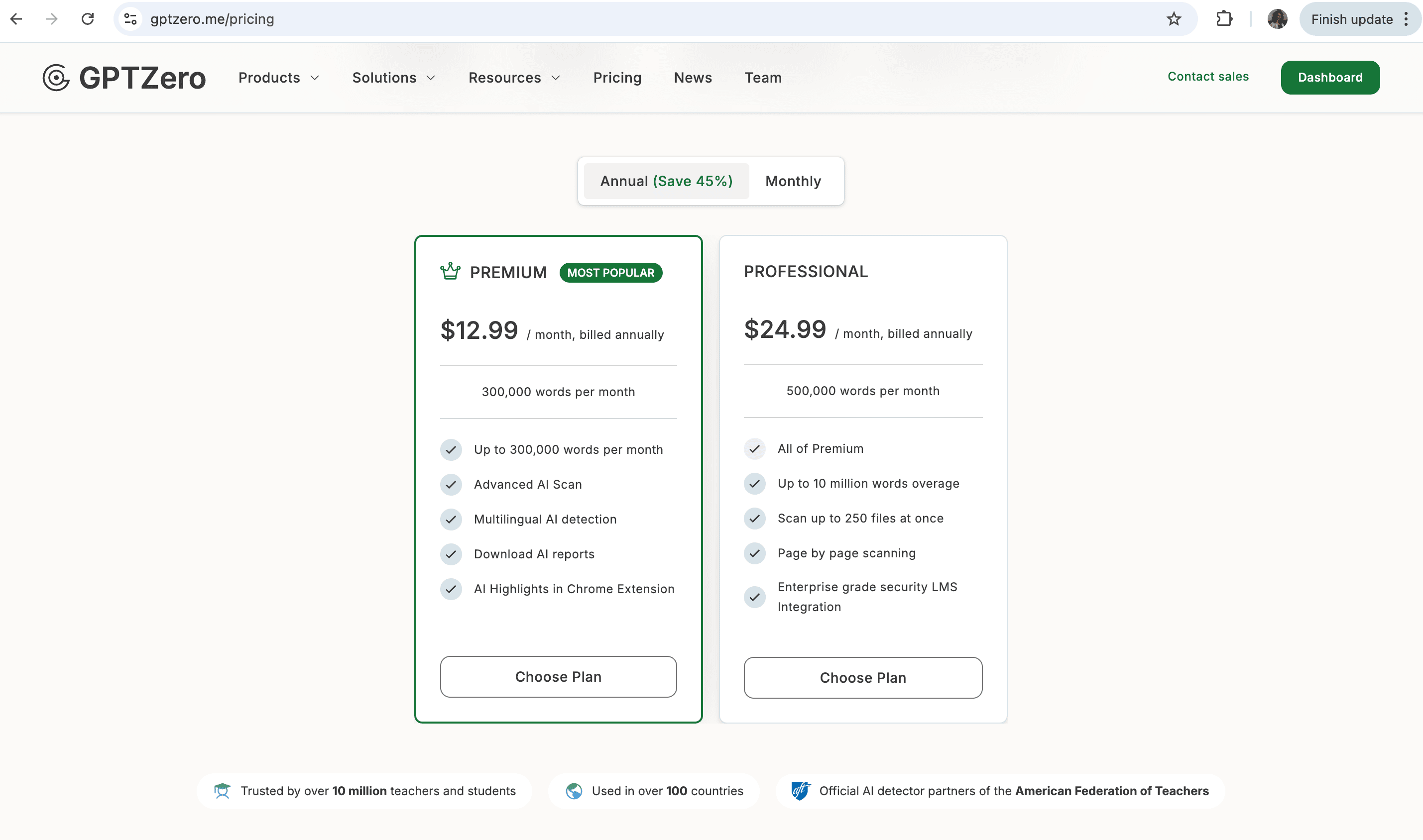
For individual students, the free plan may cover occasional use. For teachers or content teams running regular volume, the Premium plan is the minimum viable option. Professional is aimed at institutional buyers.
Pricing is reasonable compared to some alternatives, and the 45% discount for annual billing is worth taking if you're committing to the tool.
Who Should Use GPTZero?
Teachers and educators who want a first-pass check on student submissions will find GPTZero useful — particularly with Canvas integration and the ability to scan multiple files. The hallucination detector is a genuinely useful bonus for academic contexts.
Students who want to verify their own work before submission can use the free tier for occasional checks. The Human Writing Report is a useful feature if you've been flagged by an institutional tool and need to demonstrate original writing.
Content managers working primarily in English will find it functional, but the language limitations matter if your team produces multilingual content.
International and non-English users will find GPTZero less reliable. The accuracy drop on non-English text is real and the tool isn't transparent about which languages it supports at what confidence level.
GPTZero vs. Other AI Detectors
The AI detection market has grown quickly and GPTZero is no longer the only serious option. A few comparisons worth knowing:
- GPTZero vs. JustDone AI detector: JustDone takes a different approach — instead of just telling you whether text is AI, it helps you understand and fix what's flagged. The sentence-level breakdown shows exactly which parts triggered detection and why, and the built-in AI Humanizer lets you rewrite those sections without leaving the platform. For students who need to check their work and act on the results in one place, that's a meaningful workflow difference.
- GPTZero vs. Winston AI: Winston AI claims 99.98% detection accuracy and performed better than GPTZero in independent Scribbr testing. Winston is more expensive at scale but more accurate on the AI detection task specifically.
GPTZero vs. Copyleaks: Copyleaks has a stronger plagiarism checker but a weaker AI detector. If you need both in one place, Copyleaks covers more ground but the AI detection is easier to bypass. - GPTZero vs. Turnitin: Turnitin added AI detection to its established plagiarism tool, but it's had well-documented accuracy problems — some universities have stopped using its AI detection module specifically because of false positives. GPTZero outperforms Turnitin on the AI detection task in most tests.
The Bottom Line
GPTZero is a legitimate, useful tool. It's one of the more reliable free-tier options for AI detection, and the Advanced Scan and paraphrasing detection are meaningfully good. Our test confirmed that it correctly identified both a pure AI text and a humanized version of that same text, which is more than many detectors manage.
The limitations are real though. Accuracy on the free basic scan is lower than the advanced version. Non-English text is a weak spot. False positives on formal academic writing remain a known problem. And like all AI detectors, GPTZero's results are probabilistic — they're signals, not verdicts.
If you're looking for a free tool to run occasional checks on English-language text (up to three basic scans for free), GPTZero is a reasonable starting point. If you need something that also tells you what to fix and how to fix it — not just whether something was flagged — you'll want a tool that does more than detect. JustDone AI checker is the most reasonable choice in this case.
