Key Takeaways:
- ChatGPT works with tokens, not words. Input and output share the same token limit.
- Output length is the main constraint. Responses often stop early when the token cap is reached. JustDone helps handle long content without splitting it into multiple prompts.
- Prompt size directly affects response quality and length. Keep prompts under 25% of the total context window to avoid cutting off the output and losing important sections.
ChatGPT limits appear when you request a 3,000-word essay but receive only 1,200 words. They also show up when you paste a long document and the output cuts off before completion. Even with detailed prompts, responses can stop mid-sentence or truncate key sections.
ChatGPT limits are among the most misunderstood and most searched topics among AI users. The confusion makes sense: the number of ChatGPT character and word limits varies by model, the terminology is inconsistent across the internet, and OpenAI doesn't exactly make the constraints obvious in the interface.
This guide explains exactly how ChatGPT character limits and word limits work, what the real numbers are in 2026, and what to do when the output gets cut off. Also, I will show how to work with long-form content with more professional tools like JustDone's Essay Writer that are built specifically for the cases where ChatGPT becomes the bottleneck.
What Is the ChatGPT Character Limit?
Technically, ChatGPT doesn't operate in characters; it operates in tokens.
A token is roughly 4 characters in English, or about 0.75 of a word. The word "ChatGPT" is one token. The word "uncharacteristically" might be three or four. Punctuation, spaces, and special characters each consume tokens too.
Here’s a visual explanation of what ChatGPT token actually is.
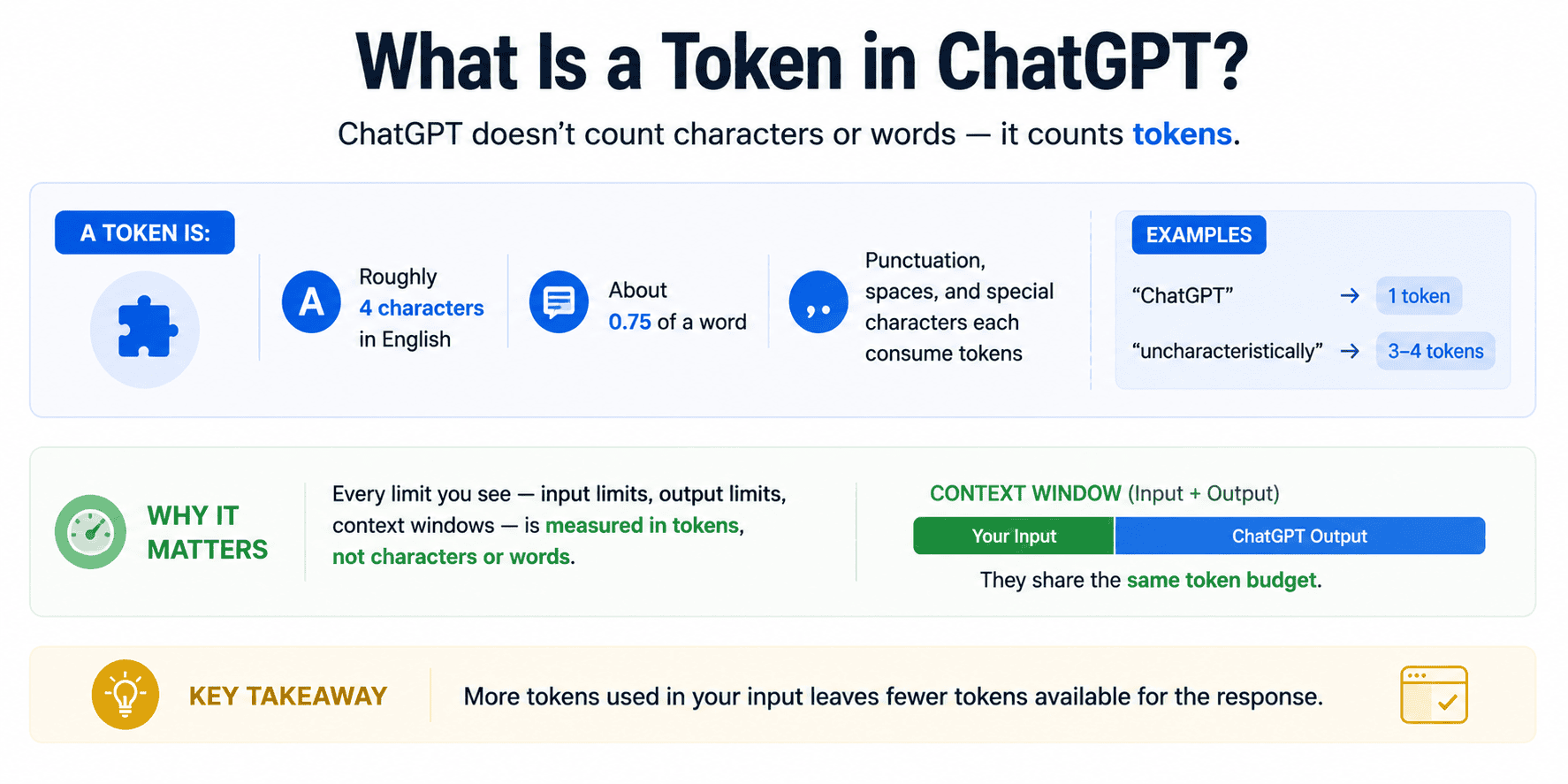
This matters because every limit you'll read about — input limits, output limits, context windows — is measured in tokens, not characters or words. When sources quote a "character limit," they're usually converting from tokens, which is why the numbers vary depending on who's writing.
Where the old numbers come from: Early ChatGPT versions (GPT-3.5) had a context window of 4,096 tokens or roughly 3,000 words total across both input and output. This number got widely quoted and stuck around long after newer models expanded it significantly.
Where things stand in 2026: GPT-4o and GPT-5 operate with context windows of 128,000 tokens or more. It is roughly 96,000 words, or about 300 pages of a Word document. The 4,096 token limit is no longer relevant for most users.
You can check how many tokens your specific text uses with the OpenAI Tokenizer, and verify the current context window for each model in OpenAI's Models documentation.
How Many Words Can ChatGPT Take?
Here's a practical breakdown of current model limits. Note that the context window covers the combined total of input and output, not each separately.
Model | Context Window | Words (input + output combined) | Max Output |
|---|---|---|---|
| GPT-3.5 Turbo | 16k tokens | approx. 12,000 words | approx. 4,000 words |
| GPT-4 | 8k-32k tokens | approx. 6,000-24,000 words | approx. 8,000 words |
| GPT-4o | 128k tokens | approx. 96,000 words | approx. 16,000 words |
| GPT-5 / Plus | 128k+ tokens | approx. 96,000+ words | approx. 16,000+ words |
What it means in practice: for most writing tasks like blog posts, essays, reports, the input limit is not the real constraint with current models. The output limit is what most users actually run into.
ChatGPT Input Character Limit vs Output Limit
This is the distinction most explanations skip, and it's the one that actually affects your workflow.
- Input limit is how much text you can send to ChatGPT in a single message. With GPT-4o, this is large enough to paste entire research papers, lengthy documents, or multiple articles at once.
- Output limit is how much text ChatGPT will generate in a single response. This is controlled by a separate parameter called max_tokens and is typically capped at 4,000-16,000 tokens. This number also depends on the model and plan, but roughly it is 3,000-12,000 words.
This is why you ask for a 3,000-word essay and get 1,200 or even fewer words back. ChatGPT hit its output token limit before finishing. The input wasn't the problem, because the output cap was.
Why Responses Stop Mid-Sentence
When ChatGPT runs out of output tokens, it can stop. Sometimes, it stops in the middle of a sentence, sometimes at the end of a section, and sometimes right before the conclusion. It's not a bug. It's the model hitting a hard limit on how much it can generate in one response.
If this happens, type "continue from where you stopped" and ChatGPT will pick up from where the output ended. For longer documents where this happens repeatedly, working in sections from the start is more efficient than continually prompting to continue.
JustDone Word Counter is a useful tool, especially if you are already working in this environment. It tracks words, characters, sentences, and pages in real time, so you always have accurate metrics for your document.
ChatGPT Prompt Character Limit and Maximum Prompt Length
Your prompt is part of the context window. Every word you send in your prompt reduces the space available for the response.
Here’s what I recommend: keep your prompt to 25% or less of the total context window. For GPT-4o or CPT-5 with its 128k token window, that's roughly 32,000 tokens or about 24,000 words of prompt before it starts crowding out the response space.
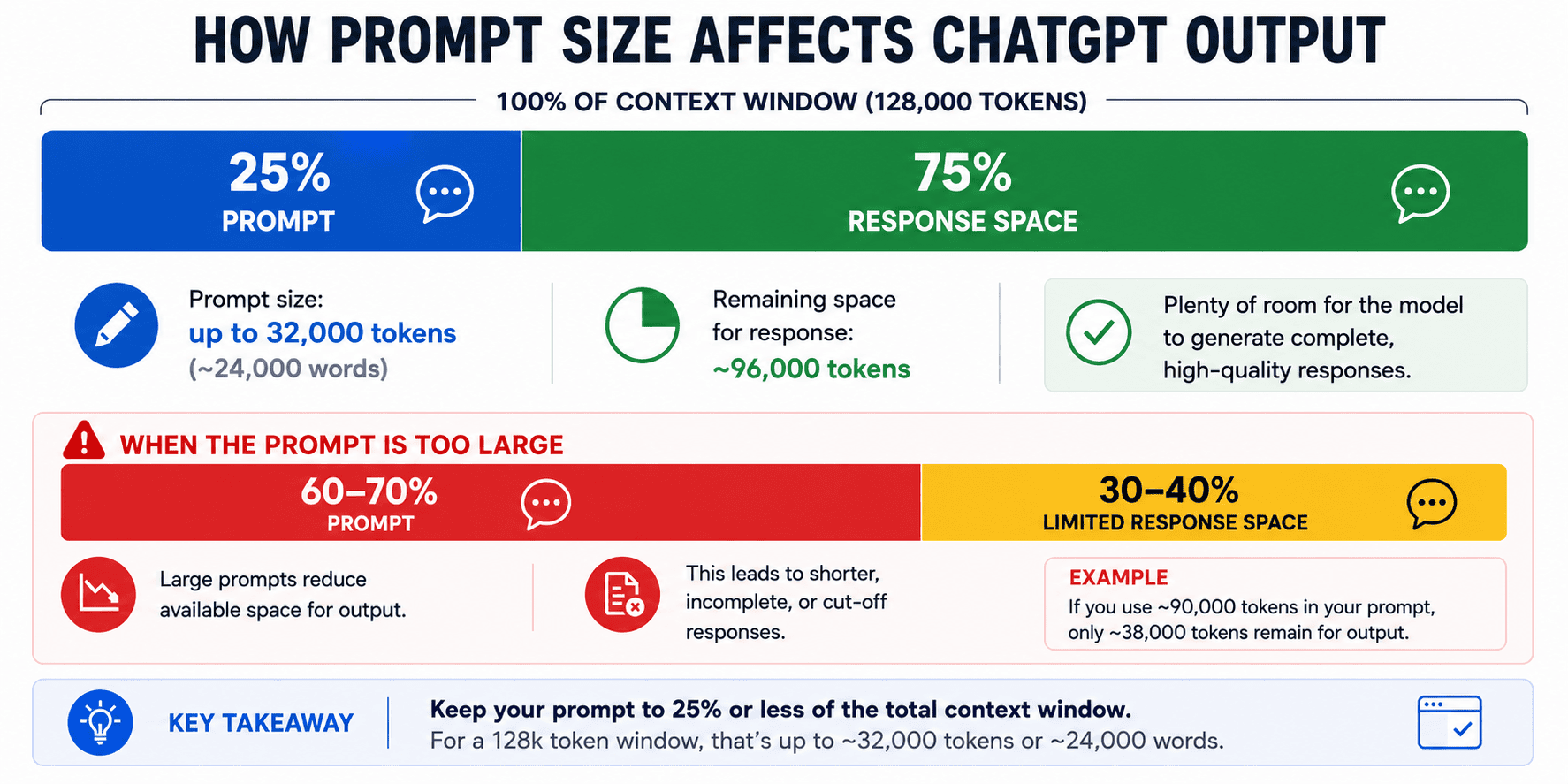
For most users, prompt length isn't the constraint. But for power users sending long documents alongside detailed instructions, it's worth knowing that a 50,000-word document plus a 2,000-word prompt leaves significantly less room for the output than the same document with a 200-word prompt.
Prompt length also affects output quality. Extremely long prompts can dilute the model's attention, leading to responses that drift from your original instructions. Tighter, more specific prompts consistently produce better output than longer, more rambling ones.
ChatGPT Plus Word Limit and Character Limit
The free version of ChatGPT uses GPT-4o mini with reduced context and stricter rate limits. ChatGPT Plus gives access to the full GPT-4o and GPT-5 models with larger context windows and higher output caps.
Feature | Free | Plus | Pro |
|---|---|---|---|
| Model access | GPT-4o mini | GPT-4o, GPT-5 | GPT-4o, GPT-5, extended limits |
| Context window | Limited | 128k tokens | 128k+ tokens |
| Max output | approx. 4,000 tokens | approx. 16,000 tokens | approx. 16,000+ tokens |
| Rate limits | Strict | Higher | Highest |
| Approximate max words (output) | approx. 3,000 words | approx. 12,000 words | approx. 12,000+ words |
For anyone regularly asking ChatGPT to produce long documents, Plus is a meaningful upgrade. It is not so much because of the context window (both tiers have access to large windows) but because of the higher output token limits and access to more capable models.
How Many Characters Can ChatGPT Process?
128,000 tokens translates to roughly 512,000 characters, or approximately 96,000 words: it is about 300 pages of a standard Word document at 12pt font.
In practical terms, this means you can paste an entire book chapter, a full research report, or dozens of pages of notes into a single GPT-4o or GPT-5 session without hitting the input limit.
What happens when you exceed the context window: ChatGPT doesn't crash or produce an error message in most cases. Instead, it quietly drops the oldest content from the conversation.
Typically, the earliest messages in a long thread are to be deleted to stay within the window. This is why, in a very long conversation, ChatGPT sometimes seems to "forget" something you mentioned much earlier. It hasn't malfunctioned; that content has simply scrolled out of the context window.
Memory and Custom Instructions consume context too. If you've enabled ChatGPT's Memory feature or written detailed Custom Instructions, those take up tokens in every conversation. For most users the impact is small, but in very long sessions with very long documents it adds up.
Why ChatGPT Stops Mid-Response and How to Continue
Three things cause ChatGPT to stop before finishing:
- Output token limit reached. The most common cause. The model has generated as many tokens as it's allowed to in a single response. Type "continue" or "continue from where you stopped" to get the next section.
- Context window full. In a very long conversation, the combined input and output has filled the available context. Starting a new conversation and pasting only the relevant context is usually faster than trying to work around this in the same thread.
- Model difficulty with the task. On rare occasions, especially with highly complex or ambiguous instructions, the model produces less than expected simply because it's uncertain how to proceed. Rephrasing the instruction or breaking the task into smaller steps usually resolves this.
If you find yourself constantly prompting ChatGPT to continue incomplete outputs, a paragraph rewriter can smooth and complete fragmented sections in seconds. It is faster than re-prompting and editing manually.
How to Bypass the ChatGPT Character Limit
The honest answer is that with GPT-4o and GPT-5, the input character limit is rarely the problem for most users. But the output limit is a real constraint for long-form work. Here's how to work around both:
- Break the task into sections. Don’t prompt like "write a 4,000-word article." Prompt section by section instead: introduction first, then section 1, then section 2, etc. This keeps each output within the model's per-response limit and gives you more editorial control over each part.
- Compress your prompt before sending. Long, repetitive prompts waste context space. Use JustDone's AI Summarizer to condense long source documents before pasting them into ChatGPT. This way, you get the same information in a fraction of the tokens.
- Paraphrase to shorten input text. If your source material is verbose, run it through JustDone's AI Paraphrasing Tool to reduce length before using it as context. Shorter input means more room for output.
- Switch to a model with a larger context window. If you're on the free tier hitting limits, upgrading to Plus gives you access to GPT-5 full 128K-196K token window and higher output caps.
Tools to Pair with ChatGPT for Long-Form Content
When you're working with long documents, you need to cover those gaps that ChatGPT cannot fill. Three JustDone tools can help you when you need to stitch together outputs from multiple prompts, verify AI-generated content, or prepare long text for publication.
- AI Detector — checks whether your generated text reads as AI-written. When you're combining sections from multiple prompts, the result can have inconsistent AI patterns. Running it through the detector tells you what needs attention before it goes anywhere.
- AI Humanizer — makes AI-generated text sound natural. Particularly useful when you're assembling a long document from multiple ChatGPT outputs, which can produce a patchy, inconsistent tone. The Humanizer addresses this at a structural level, not just surface vocabulary.
- Plagiarism Checker — verifies the originality of long texts built from multiple prompts. When you're working across many ChatGPT sessions on the same topic, it's worth confirming the final document reads as original before publishing or submitting.
Frequently Asked Questions
Does ChatGPT have a character limit?
ChatGPT operates in tokens, not characters. One token is roughly 4 characters. Current models (GPT-4o, GPT-5) support 128,000 tokens (approximately 512,000 characters) as a combined input and output limit.
Does ChatGPT have a word limit?
Yes. The combined input and output limit on GPT-4o is approximately 96,000 words. The output per response is typically capped at 12,000-16,000 words depending on your plan.
How many words can ChatGPT take as input?
With GPT-4o, you can input up to roughly 80,000-90,000 words in a single message, leaving room for the output. In practice, most users never hit this limit.
How many words can ChatGPT write or generate?
In a single response, ChatGPT typically generates 3,000-12,000 words depending on the model and plan. For longer documents, you need to work in sections.
What is the maximum prompt length for ChatGPT?
There's no separate prompt limit — your prompt counts toward the total context window. Best practice is to keep prompts at 25% or less of the context window to leave adequate space for the response.
Can you bypass the ChatGPT character limit?
For input limits: compress or summarize your source material before pasting. For output limits: break your task into sections and prompt each one separately. Upgrading to Plus also increases your output cap significantly.
How do I get ChatGPT to write more than 500 words?
Be explicit in your prompt: "Write a 1,500-word article on [topic]." If it still stops short, prompt it to "continue from where you stopped." For consistently long outputs, break the task into sections from the start.
Can ChatGPT write a 3,000-word essay?
Yes, but usually not in a single response. Prompt it section by section — introduction, body sections, conclusion — and assemble the parts. JustDone's Essay Writer handles long-form essay generation in one workflow without the section-by-section assembly.
How big a text file can ChatGPT read?
GPT-4o and GPT-5 can process approximately 300 pages of standard text in a single context window. Files significantly larger than this will require chunking into multiple sessions.
