Key takeaways:
- The right prompting matters most. Telling ChatGPT to "write like a practitioner talking to peers" or "write this as if typed on a phone in 30 seconds" produces more natural output than abstract instructions like “write casually.”
- ChatGPT's Custom Instructions feature works as a persistent system prompt. Set a word ban list, sentence variation rules, and style constraints once, and they apply to every conversation automatically without repeating them in every chat again.
- When prompts aren't enough, JustDone AI Detector shows which sentences still read as machine-generated. The AI Humanizer fixes them structurally and makes the tone more natural.
Quick answer: To make ChatGPT sound more human, use a system prompt that bans AI giveaway vocabulary, forces sentence length variation, and sets a specific human scenario before generating anything. The prompts below do exactly that.
ChatGPT output has a texture that most people recognize immediately: every paragraph balanced, every transition handled, and every sentence is too polished. The problem is not ChatGPT itself. It is how most people prompt it. The right prompt to make ChatGPT write like a human is not complicated, but most people have never seen one. By default, the model writes like an AI assistant because nobody told it not to.
This guide gives you a system prompt template, four task-specific prompts, a list of words to ban, and a technique for training ChatGPT on your own voice.
The System Prompt Approach
Most people treat every ChatGPT conversation like a fresh start, typing a new request each time. There is a better way of how to make chat gpt sound human.
ChatGPT has a Custom Instructions feature. Essentially, it is a system prompt that applies to every conversation automatically. Instead of adding rules to each individual prompt, you set them once, and ChatGPT follows them by default.
Go to your profile icon, select "Customize ChatGPT," and paste something like this into the "How would you like ChatGPT to respond?" box:
You are writing as a real person, not an AI assistant.
Rules:
- Vary sentence length. Mix short punches with longer flowing ones.
- Use contractions: it's, don't, won't, you're, they're.
- Avoid these words entirely: "delve", "moreover", "furthermore",
  "it is important to note", "in today's fast-paced world",
  "leverage", "utilize" (use "use" instead), "tapestry", "robust".
- Skip generic openers like "In this article, we will discuss..."
- Allow small stylistic imperfections — start sentences with
  "And" or "But" when it sounds natural.
- Be direct. If something is bad, say it's bad. No hedging.
- Use concrete examples over abstract claims.
Save it, open a new chat, and the difference is immediate.
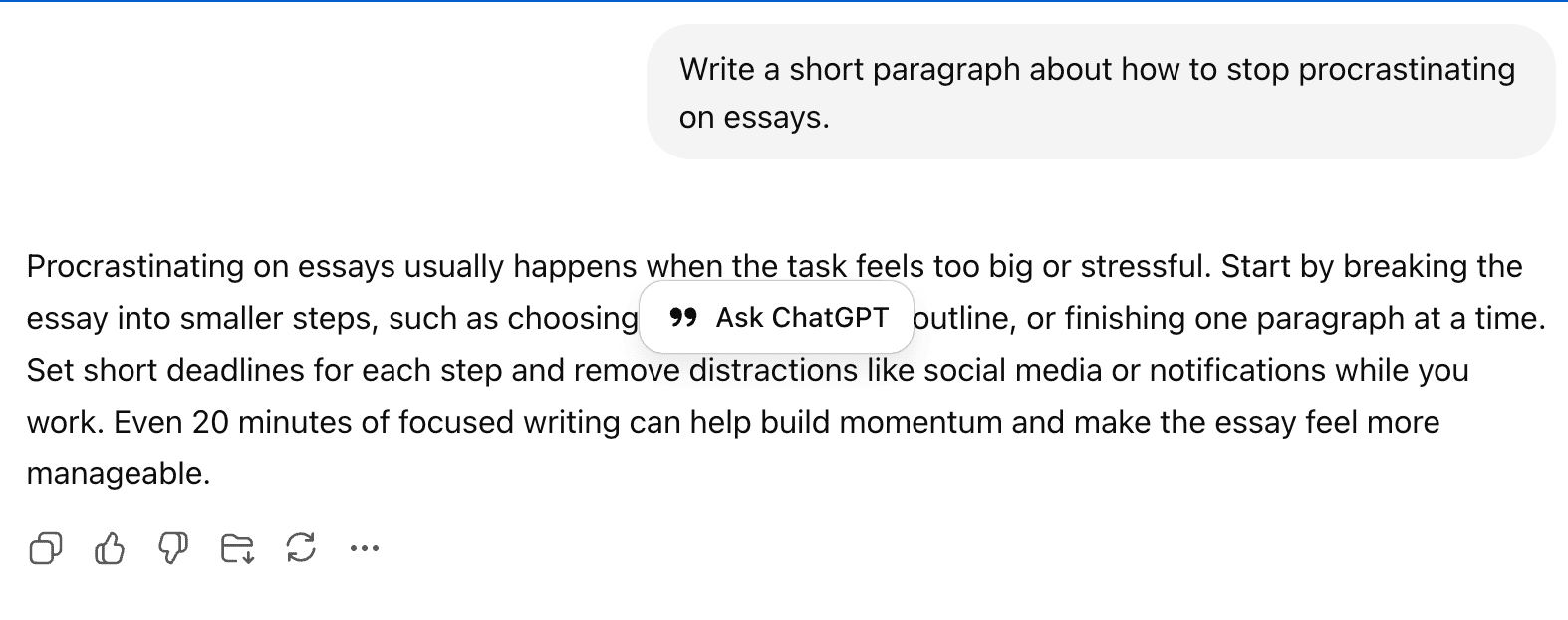
Let’s look at a practical example. Imagine you need to write an essay about procrastination. Here are two different prompts: one basic version most students would use, and one customized version that gives clearer direction and better results.
The output within the simple prompt:
The output within the second personalized prompt.
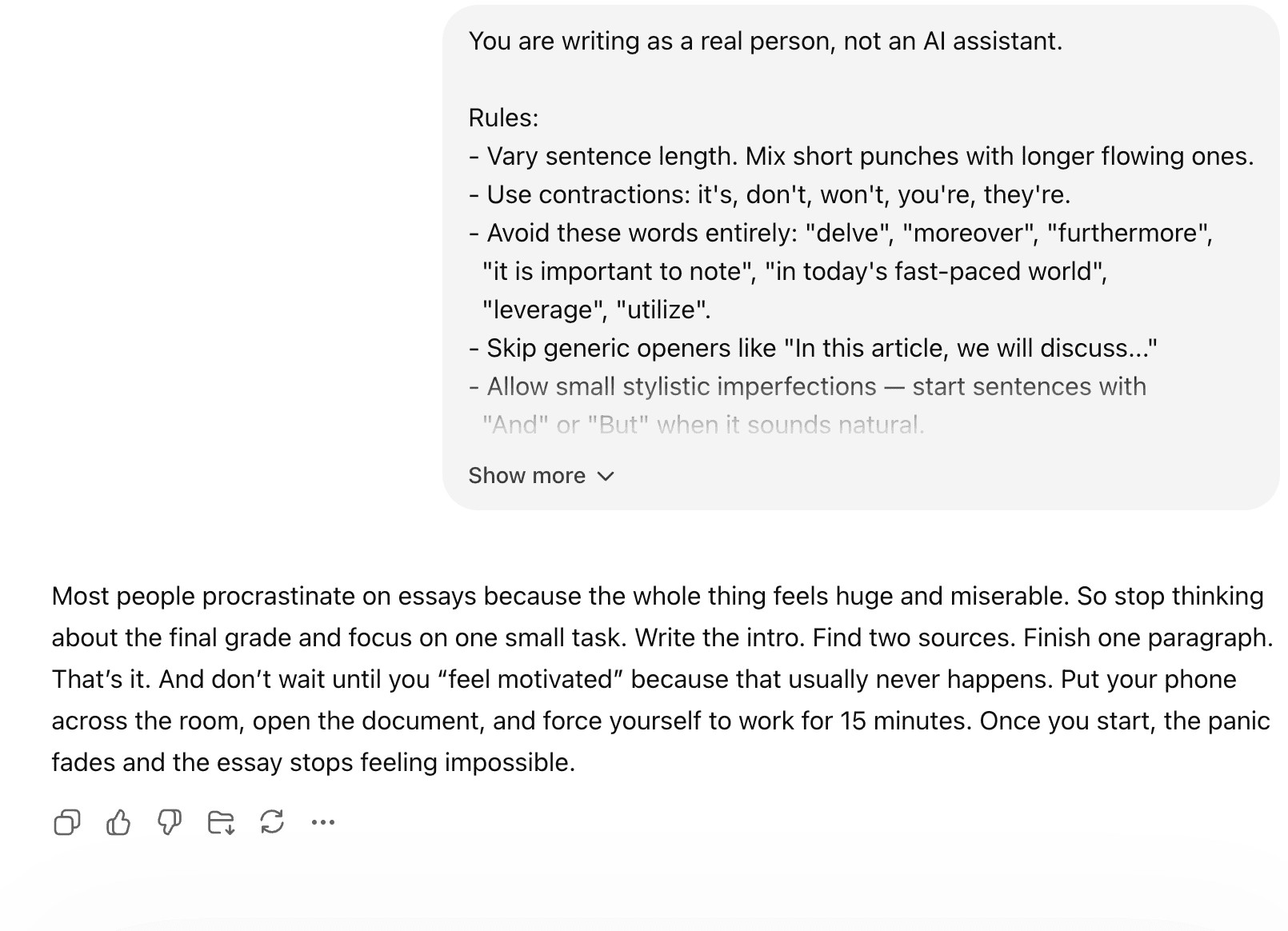
The difference is obvious – the second output sounds more natural and human.
Prompts to Make ChatGPT Write Like a Human
Even with Custom Instructions set, the specific prompt you use for each task matters. Here are four that consistently produce more natural output.
1. For a Blog Post or Essay
Write a 600-word post on [TOPIC]. Voice: a practitioner
talking to peers, not an SEO copywriter. Use contractions,
vary sentence length, include one concrete example.
No headers like "Introduction" or "Conclusion".
The key phrase here is "practitioner talking to peers."
It tells ChatGPT to assume the reader already knows the basics, which cuts most of the padding that makes AI writing obvious.
2. For an Email or Message
Rewrite this draft so it sounds like I actually typed it
on my phone in 30 seconds. Direct, contractions, no
formal sign-offs. Keep it under 80 words.
[Paste your draft]
This works because it gives the model a very specific physical scenario to simulate. "Typed on my phone in 30 seconds" communicates more about tone than any style adjective you could use.
3. For Social Media
Write a LinkedIn post on [TOPIC]. Voice: someone with
opinions, not a brand. Start with a hook.
No "I'm excited to share..." cliché. Maximum 150 words.
4. Rewrite Mode
Take this AI-generated text and rewrite it as if a tired
human wrote it at 11pm. Keep the meaning. Vary sentences.
Cut filler. Allow imperfection.
[Paste the text]
This is the one to use when you already have a draft that does not sound right. The "tired human at 11 pm" framing sounds strange, but it produces consistently less polished, more authentic output.
Style Modifiers and What to Ban
You can add short modifiers to any prompt to shift the tone without writing a full system prompt every time.
Add these to push toward natural writing:
- "casual but informed"
- "skeptical, not promotional"
- "short sentences mixed with long ones"
- "write like a smart friend, not a textbook"
- "personal voice, not institutional"
- "no corporate hedging"
Ban these words directly in your prompt: delve, tapestry, moreover, furthermore, in essence, it goes without saying, navigating the complexities, leveraging, robust, seamless, in today's world, it is worth noting.
Listing the words you do not want is more reliable than asking for a "casual tone." Models understand prohibition more precisely than style description.
Train ChatGPT on Your Own Voice
This is the technique most students skip, but it is the most effective one for longer pieces where your voice actually needs to be consistent.
Paste three paragraphs of your own previous writing into ChatGPT before you make your request:
Here are three examples of how I write:
[Paste paragraph 1]
[Paste paragraph 2]
[Paste paragraph 3]
Now write a [TOPIC] post in the same voice — same rhythm,
vocabulary, level of formality.
Use writing from different contexts if you can — a casual email, a class assignment, a text to a friend. The more variety in the examples, the better the model calibrates to your actual voice rather than an average of everything you have written.
The output will not be perfect. But it will sound more like you than anything ChatGPT produces without that context.
When Prompts Hit Their Limits
Even the best prompts do not guarantee detection-safe output. ChatGPT can follow all your instructions and still produce text that patterns like AI when you run it through a detector. If you have tried everything above and are still wondering how to make ChatGPT not sound like AI, the issue is usually that structural signatures of AI writing go deeper than vocabulary and contractions.
Have a piece that matters – an essay, a cover letter, something being submitted anywhere? Run it through JustDone's AI Detector first. It shows you a sentence-level breakdown of what is driving the AI score, not just an overall number. You will see exactly which lines still read as machine-generated and can target your edits.
If the rewriting feels like too much work or you are running out of time, JustDone's AI Humanizer handles the structural-level rewriting that prompts alone cannot reliably produce. The tool can rebuild sentence rhythm and remove AI patterns without changing your meaning.
FAQ
How do I make ChatGPT write like a human?
Use Custom Instructions to set persistent rules, give task-specific prompts that simulate a human scenario, ban the AI giveaway vocabulary list explicitly, and paste examples of your own writing for the model to calibrate to. Run the output through an AI detector before using it anywhere that matters.
How to make ChatGPT act like a person?
The most effective single instruction is to give it a specific human scenario to simulate — "write this like someone explaining it to a friend over coffee" or "write this like a tired person at 11pm." Specific scenarios outperform abstract style instructions every time.
How to 100% humanize AI text?
No single prompt guarantees it. The most reliable method is combining good prompts with manual editing and a structural-level humanizer tool. JustDone's AI Humanizer addresses the statistical patterns that detectors measure — sentence rhythm, phrase predictability — which prompts alone cannot consistently fix.
Can I give ChatGPT a personality to write human-like content?
Yes, and it works well. Describe a specific type of person rather than an abstract personality trait. "Write as a second-year medical student who is slightly sleep-deprived" produces more distinctive output than "write in a conversational tone."
Can ChatGPT humanize text?
It can improve human-sounding output when prompted correctly, but it often retains the same underlying structural patterns even when rewriting. For text that needs to pass AI detection, a dedicated humanizer tool is more reliable than asking ChatGPT to rewrite its own output.
Does ChatGPT Plus sound more human?
Plus gives you access to better models with more nuanced outputs, which can reduce some of the most obvious AI patterns. But the difference is less significant than how you prompt — a well-prompted response on the standard tier often sounds more natural than a poorly prompted Plus response.
What tone should you tell ChatGPT to write in to sound more human?
Avoid abstract tone words like "friendly" or "professional," because they produce generic results. Use scenario-based framing instead: "explain this to a smart friend," "write this like a practitioner talking to peers," "write this like a person who has strong opinions about the topic."
How to make AI sound more human across other tools?
The same prompting principles apply to Gemini, Claude, and other models: ban the giveaway vocabulary, vary sentence length explicitly, use scenario framing, and paste examples of your own writing. Claude in particular responds well to style calibration from examples. Run any output through JustDone's AI Detector to verify before using it.
