Key Takeaways:
- Prompt structure determines output quality. The 5 P's framework — Persona, Purpose, Product, Prompt details, and Polish — turns a vague ChatGPT request into a specific brief that produces usable output from the first try.
- Every stage of blog writing has a prompt for it. The 26 templates in this guide cover the full workflow — from topic ideation to image briefs — so you're not adapting a general-purpose prompt and hoping it works.
- JustDone transforms the prompt engineering entirely. If building the right prompt for every stage sounds like too much work, JustDone's AI Middle and Long Article Generator, AI Detector and AI Humanizer handle the full workflow (drafting, humanizing, and quality checks) in one place.
According to Orbit Media's annual blogging survey, the average blog post now takes 3 hours and 30 minutes to write. The result is a nearly 1,333-word post. With 600 million blogs competing across 1.9 billion websites, the gap between publishing fast and publishing well has never been so noticeable.
With ChatGPT, it has been changed. The right ChatGPT prompt at the right stage of your writing process cuts hours of manual work. But generic prompts produce generic output. What you actually need are prompts built for specific tasks — ideation, outlining, drafting, introductions, CTAs — with the variables that make them work for you.
This guide gives you 26 ready-to-use ChatGPT prompts for writing blog posts, organized by stage. Copy them, fill in the brackets, and get content that sounds like you wrote it.
Why Use ChatGPT to Write Blog Posts?
If write a blog post from scratch from researching to revising, it will take hours. ChatGPT doesn't eliminate that work, but it removes the parts that slow you down most: the blank page, the structural decisions, and the throwaway first draft you'd rewrite anyway.
Here's what makes ChatGPT specifically useful for blog writing.
- It thinks in structure. Ask ChatGPT to outline a post and it immediately organizes ideas into logical sections with supporting points. Most writers don't naturally do this — it usually takes several drafts before a structure actually clicks. ChatGPT gets you to a working outline in under a minute, so your time goes toward writing content rather than figuring out where things go.
- It generates options quickly. Need 15 blog angles on a topic? Ten intro variations? Three different CTAs for the same post? One prompt gets you a range to choose from. Choosing from options is almost always faster — and produces a better result — than committing to the first thing that comes to mind.
- It gets you past the blank page. The hardest part of any blog post isn't the writing. It's starting. Give ChatGPT an outline, a list of bullet points, or even a one-sentence description of your topic and it will produce something to work from. Editing a rough draft is faster than writing from nothing — most writers find it cuts their actual time at the keyboard in half.
- It takes the mechanical parts off your plate. Meta descriptions, FAQ sections, transition sentences, conclusion summaries — all necessary, none of them worth your best thinking. ChatGPT handles these reliably so you can spend that energy on the sections that actually require your knowledge and perspective.
- It's useful at every stage, not just drafting. Most writing tools do one thing. ChatGPT is useful for ideation on Monday, outlining on Tuesday, drafting on Wednesday, and rewriting on Thursday. Same tool, same interface, prompts you can refine and reuse across your whole content process.
- It makes higher publishing frequency realistic. One post a week is manageable without AI. Three to five posts a week — the frequency that actually builds organic traffic — usually isn't, not without a team. ChatGPT makes that volume possible without a proportional increase in hours.
One thing worth being clear about: ChatGPT produces drafts, not finished posts. The content that actually performs is always the version where a real person added real specifics — their experience, their examples, their take on the topic. Use ChatGPT for the scaffolding. Use your own knowledge to make it worth reading.
However, if you need long-form content specifically, use something more specific than ChatGPT. JustDone's Long Article Generator and AI Article Writer can handle the full drafting workflow in one place.
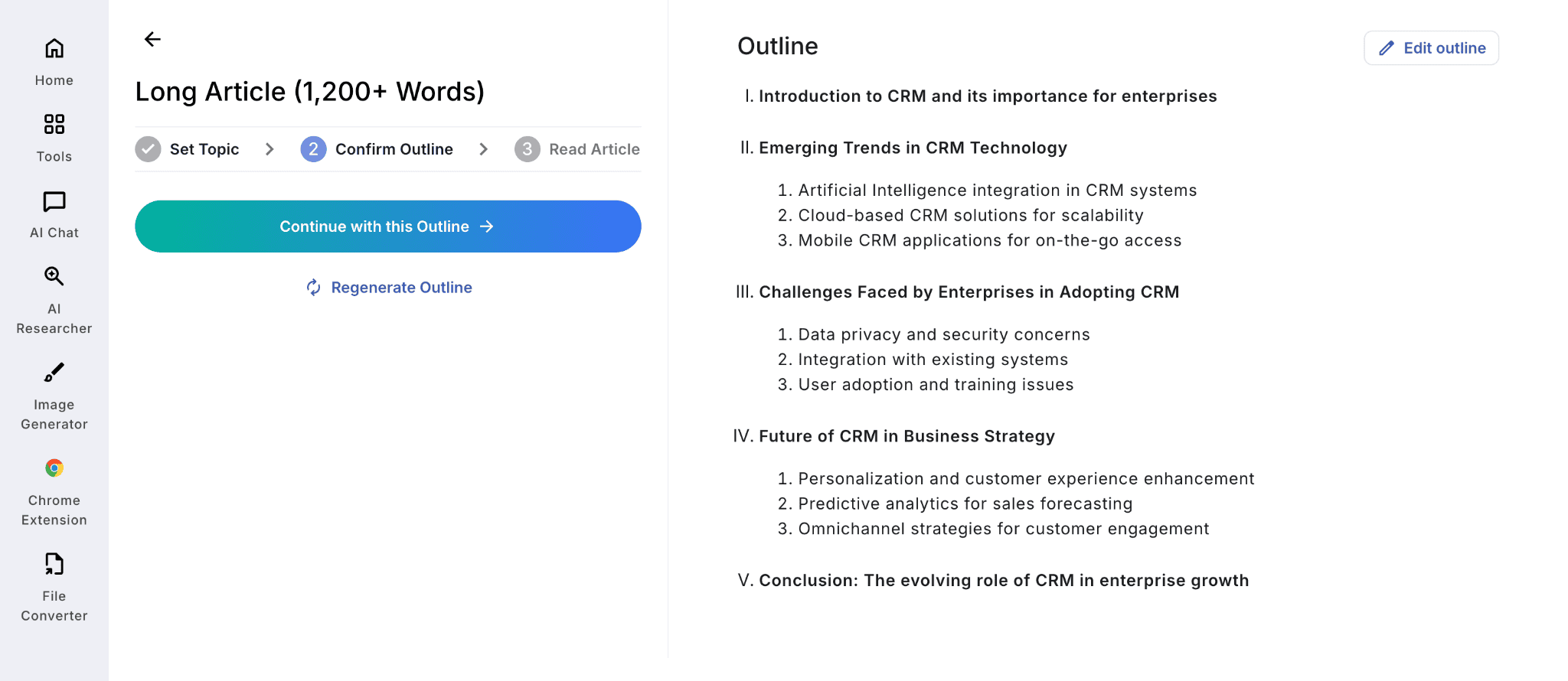
Here’s how it works for the topic about about CRM use for business enterprises. First, JustDone Long Article Generator builds an outline.
It then generates the article and displays the word count, character count, and page length.
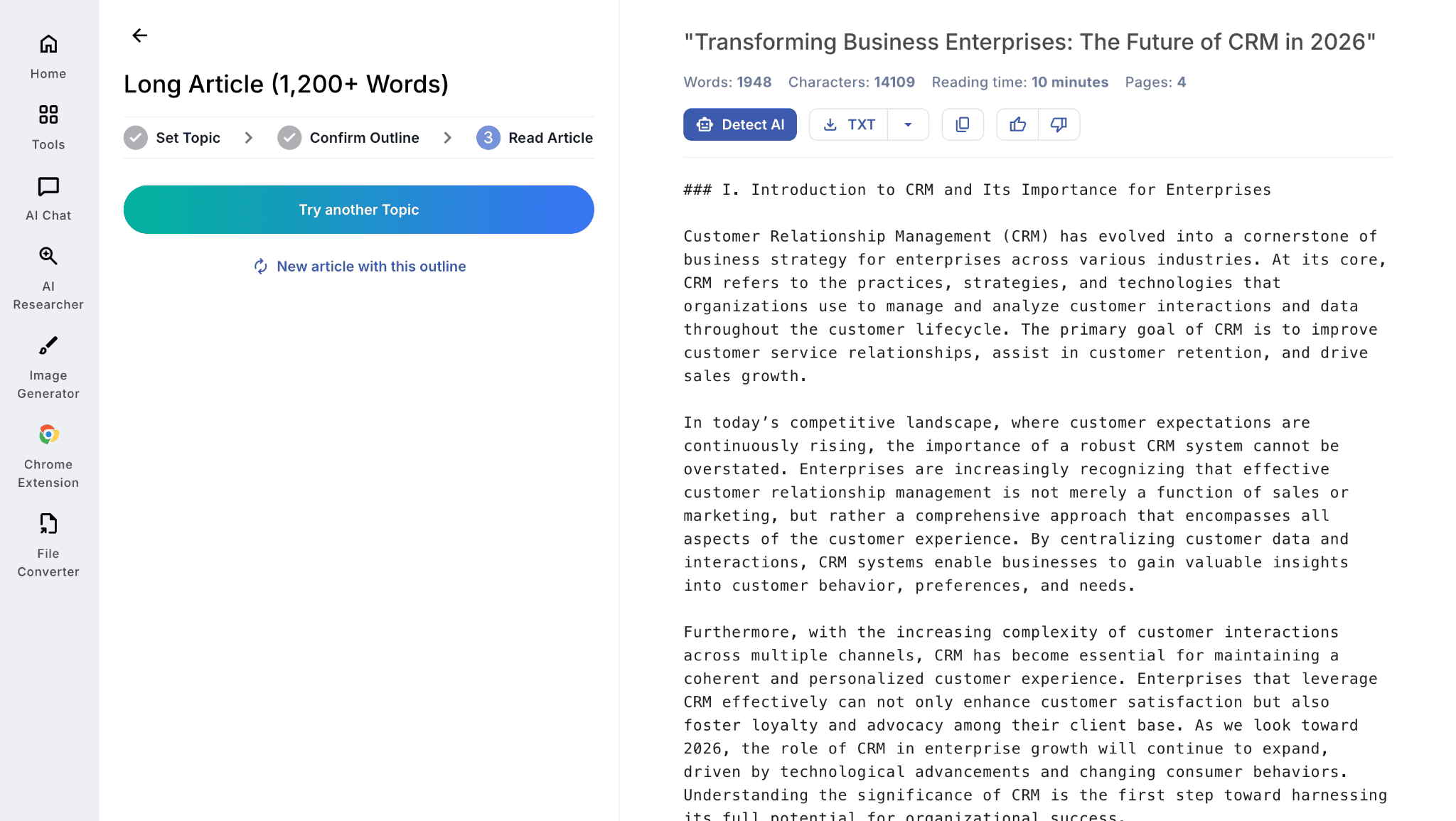
You can detect AI of this output or generate another article within the same topic if the result does not satisfy you. JustDone medium and long article generators are especially useful when you need a complete 1,200+ word post without piecing together multiple ChatGPT outputs.
The 5 P's of Prompting
Before the templates, the framework. Every effective ChatGPT blog writing prompt has five elements. Skip one and the output defaults to the most average version of whatever you asked for.
Persona — Tell ChatGPT Who It Is
Who is ChatGPT acting as? This single instruction changes the vocabulary, tone, depth of reasoning, and assumptions the model makes about your reader.
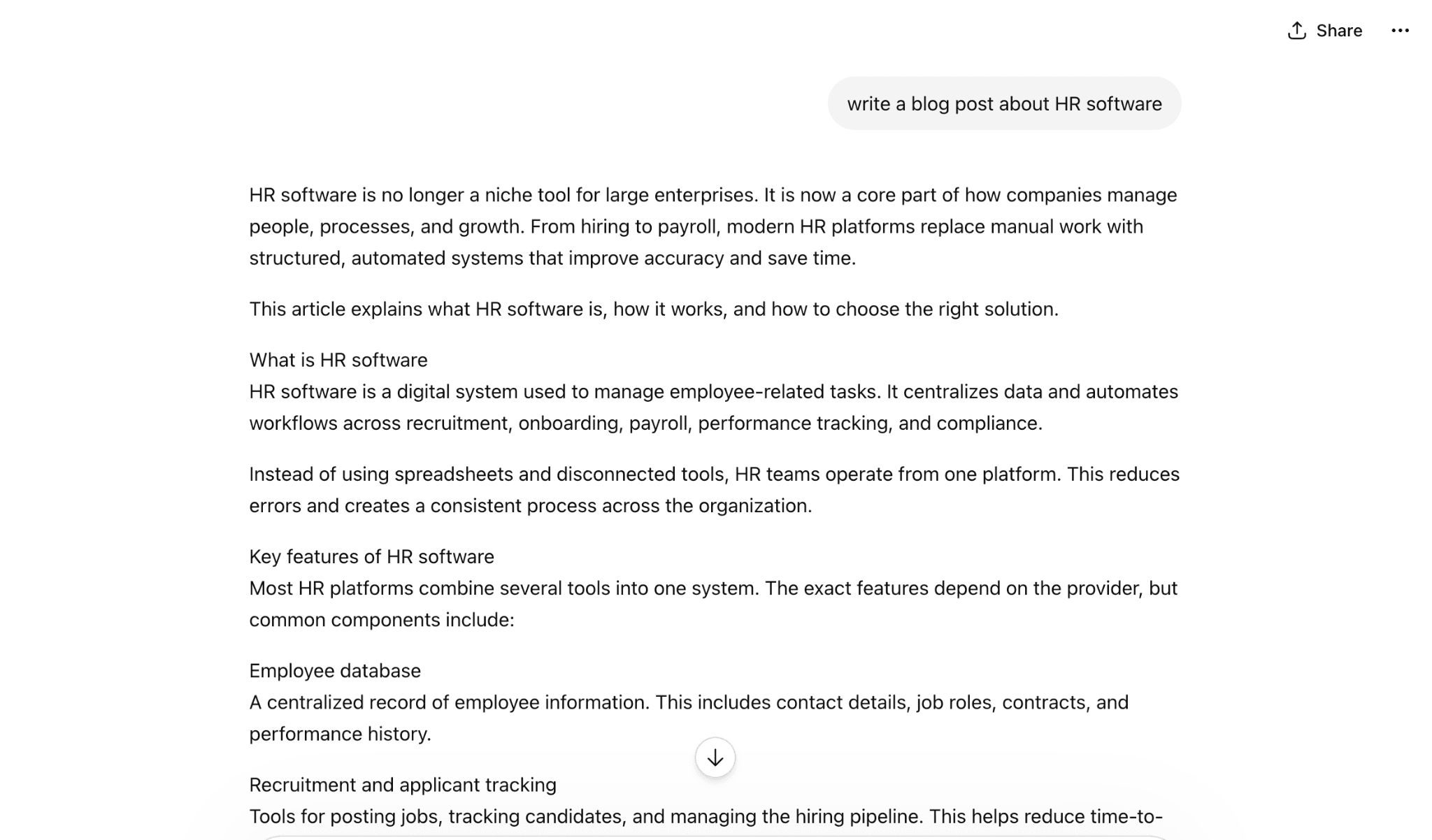
"Act as a B2B content marketer with 8 years of experience writing for HR tech companies targeting enterprise buyers" produces fundamentally different output than "write a blog post about HR software."
Let’s compare the results:
And here’s a much better output within the persona-oriented prompt:
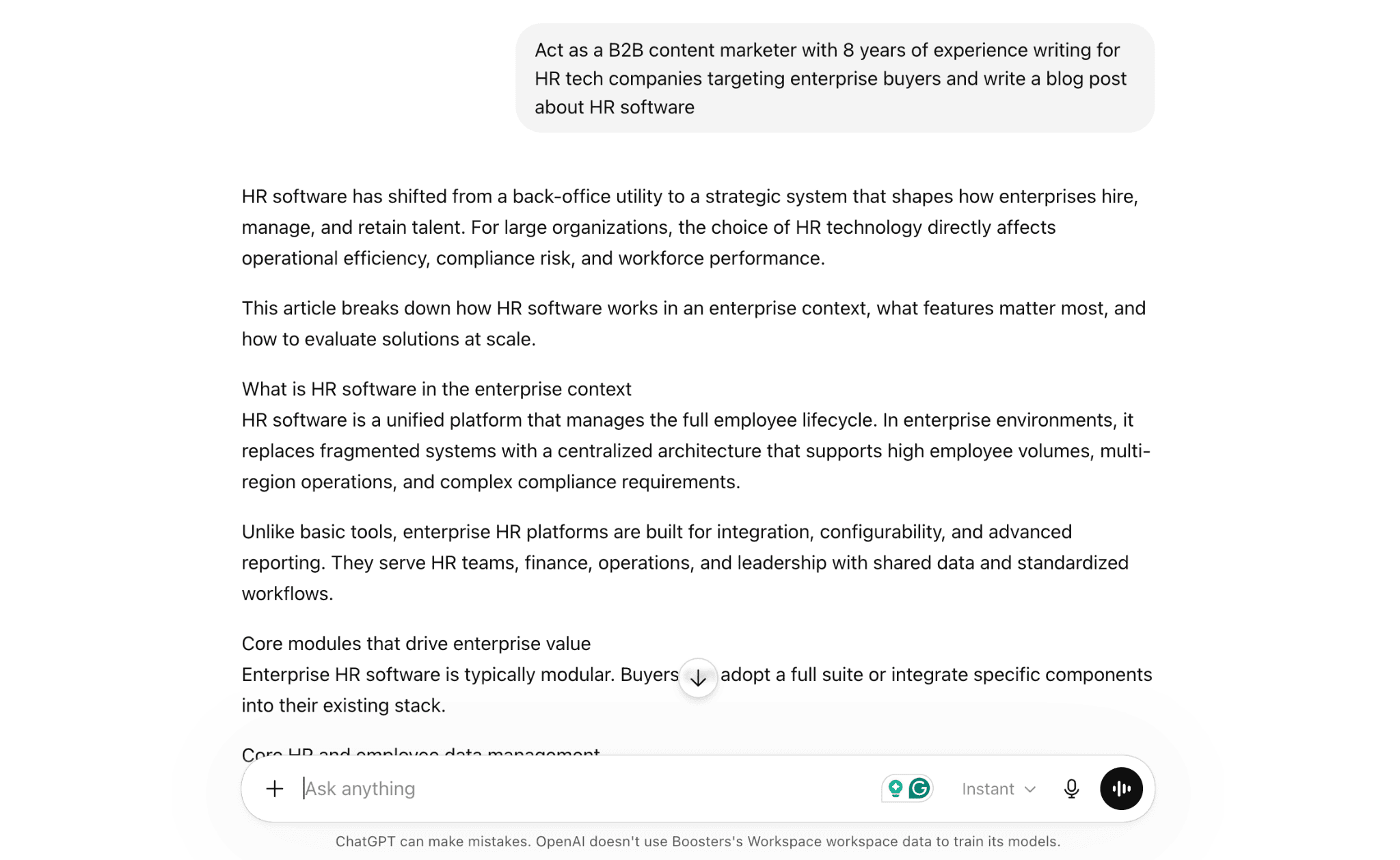
The more specific the persona, the better the output. You can also define the reader's persona — "write this for a first-year marketing manager who understands content basics but has never used AI in their workflow" — which shapes vocabulary, explanation depth, and the examples ChatGPT reaches for.
Purpose — Define the Exact Output You Need
What specific deliverable do you need? "Write a 1,500-word how-to guide" is a completely different task from "brainstorm 15 blog topics," even on the same subject.
Be explicit about both format (list, outline, narrative, comparison table) and function (ranking on Google, converting readers, building topical authority). A post designed to rank needs different construction than a post designed to convert — and ChatGPT needs to know which one you're writing.
Product / Topic — Be Specific About What You're Writing
Vague topic definitions are one of the most common reasons ChatGPT misses the mark. "AI writing tools" produces a surface-level overview.
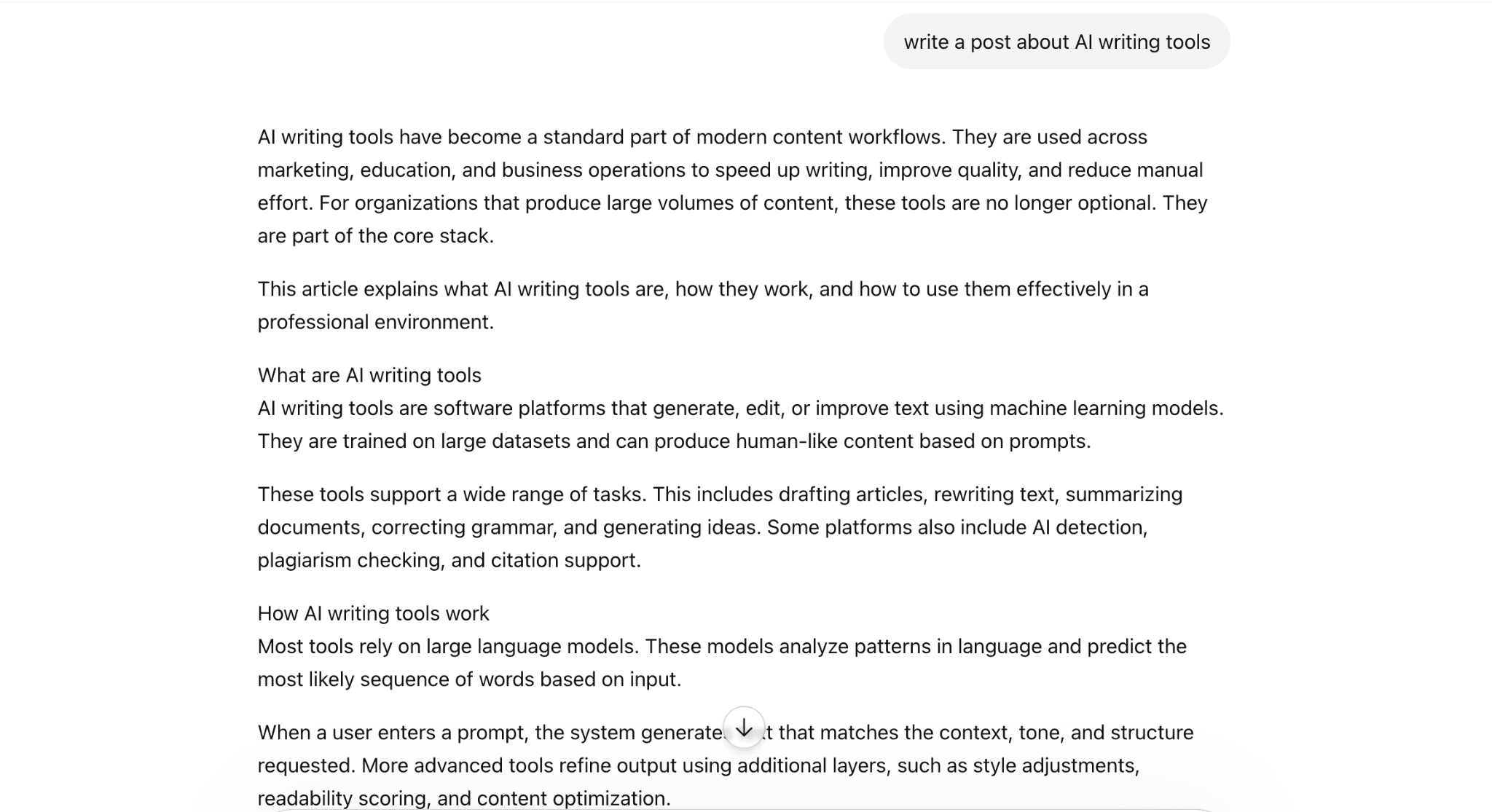 "How mid-sized content teams use AI writing tools to reduce first-draft time without losing brand voice" produces something specific enough to be useful.
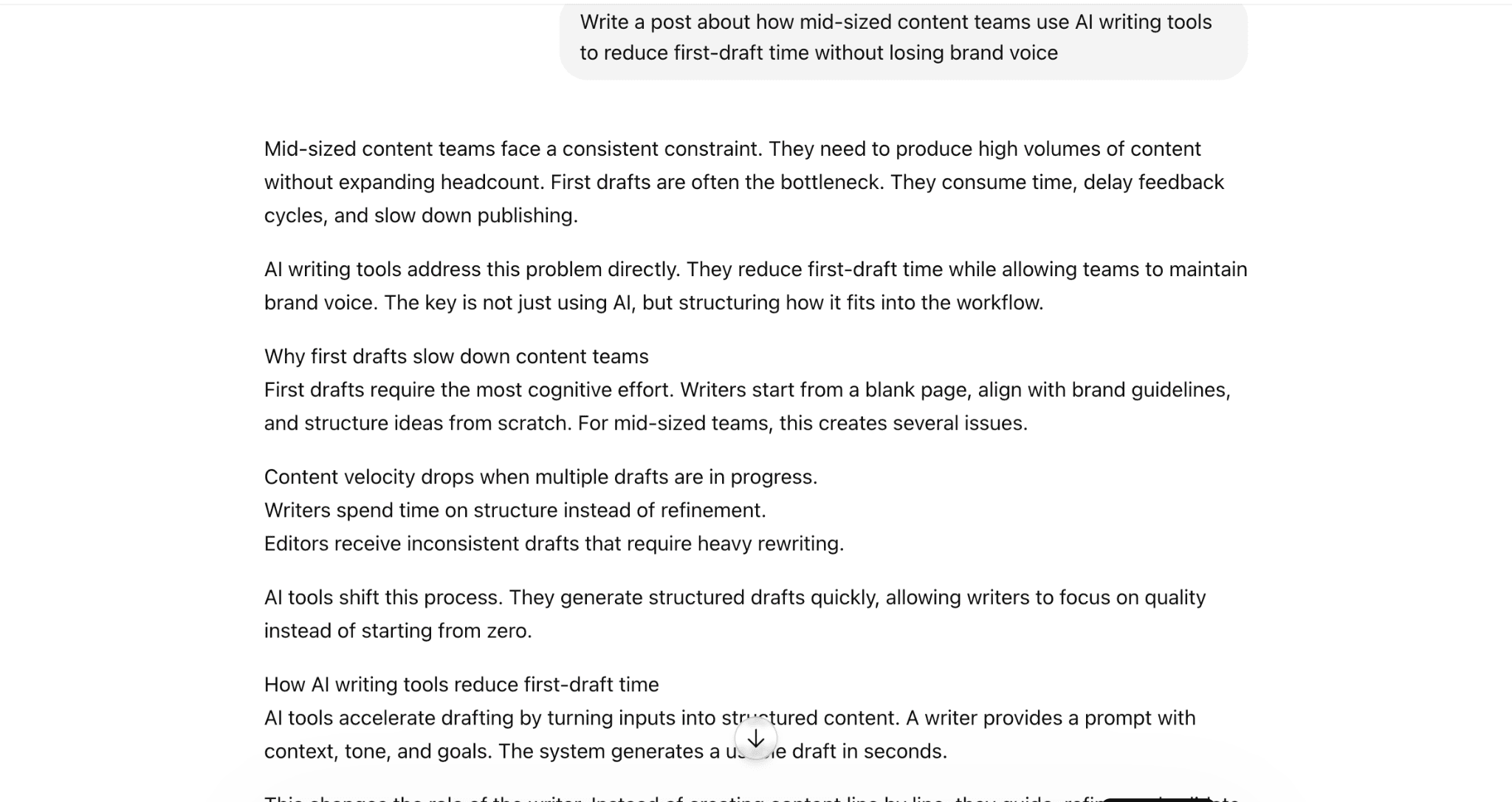
Three things make a topic specific enough: the exact subject, the audience lens, and the angle. If you have a target keyword, paste it verbatim — don't paraphrase it. ChatGPT will place it naturally in context, which is what on-page SEO actually requires.
Prompt Details — The Layer Most Prompts Skip
Length, tone, structure, keywords, and what to avoid. This is where most prompts fail — too vague produces too generic.
Specify word count exactly. Describe tone in concrete terms ("direct and data-driven, no motivational language") rather than abstract ones ("professional"). Include structural instructions if you need specific H2 and H3 placement. Paste your target keyword and specify where it should appear. Add negative constraints — "don't open with a question," "avoid bullet points in every section" — to prevent the default patterns that make AI output feel formulaic.
Polish — What You Do With the Output
AI output is the draft, not the deliverable. Add your specific knowledge and real examples. Fact-check every statistic and claim. Rewrite sentences that don't sound like you. Run the draft through JustDone's AI Humanizer to address structural AI patterns that manual editing misses, and verify the result with the AI Detector before publishing.
Polish isn't the afterthought. It's where the draft becomes the article.
ChatGPT Blog Prompts for Blog Post Ideas
According to HubSpot's 2026 State of Marketing report, half of all consumers now use AI-powered search. This means generic content gets filtered out before it ever reaches your audience. Use these when you need topics, not just titles. Each prompt is designed to produce usable ideas with strategic context attached.
Purpose | Prompt |
|---|---|
| Topic brainstorm | I run a blog about [TOPIC] for [TARGET AUDIENCE]. Suggest 15 fresh blog post ideas grouped by funnel stage (TOFU, MOFU, BOFU). For each, give the search intent and 1 angle that's not yet on Google's first page. |
| Niche validation | I'm starting a blog in the [NICHE] niche. Give me 5 sub-topics with proven search demand, and for each give 8 specific blog post ideas with target keywords and difficulty estimate. |
| Competitor gap | Here are the top 3 ranking articles for [KEYWORD]: [LINK1], [LINK2], [LINK3]. List 10 angles or sub-topics they all miss that I could cover in my next blog post. |
| Pain-point ideas | List 20 specific pain points [TARGET AUDIENCE] face when [TASK]. Turn each into a blog post title that promises a clear outcome. |
| Trend-driven ideas | Based on recent discussions in [INDUSTRY] in 2026, suggest 10 timely blog post ideas with a 6–12 month relevance window. For each, explain why the timing matters now. |
If you don't know what kind of topic to choose for your post, use JustDone's AI Research Tool to find angles backed by real search data. This tool can generate random topic angles and research starting points that speed up the ideation stage.
ChatGPT Blog Writing Prompts for Post Outlines
A good outline is half the article. These ChatGPT blog writing prompts produce structured, SEO-aware skeletons you can fill in rather than starting from scratch.
Purpose | Prompt |
|---|---|
| SEO-optimized outline | Create a detailed blog post outline titled "[TITLE]" for [TARGET AUDIENCE]. Include H2 and H3 headings. Place the exact keyword [KEYWORD] in the title and at least 3 H2s. For each H2, list 3 bullet points to cover. |
| How-to guide outline | I'm writing a how-to guide on [TASK]. Build a step-by-step outline with 7–10 numbered steps. For each step include the goal, 1 common mistake, and a 1-line example. |
| Listicle outline | Outline a listicle titled "[TITLE]" with 12 items. Group items into 3 themed sections. For each item, write a 1-sentence summary and one stat or example to research. |
| Comparison post outline | I'm writing a blog post comparing [PRODUCT A] vs [PRODUCT B] for [AUDIENCE]. Build a comparison outline with criteria, pros/cons, use-case verdicts, and an FAQ section. |
| Pillar page outline | Build a pillar page outline for [BROAD TOPIC]. Include H2s for each sub-topic and recommend 6 cluster posts I should also write to internally link to this page. |
Prompts for Writing Full Blog Posts
These prompts produce complete drafts by post format. Each is built around a specific structure, so the output is organized from the start rather than requiring heavy restructuring afterward.
Post Type | Prompt Name | Prompt |
|---|---|---|
| Standard Blog Post | Standard blog post draft | Write a 1,500-word blog post titled "[TITLE]" for [AUDIENCE] in a [TONE] tone. Use the outline below. Use active voice, short paragraphs, and bullet points where helpful. Include the keyword [KEYWORD] naturally 6–10 times. Outline: [PASTE]. |
| How-To Guide | How-to guide draft | Write a how-to blog post titled "[TITLE]" with numbered steps. For each step include: what to do, why it matters, a real-life example, and a common pitfall. End with a recap and CTA. |
| Listicle | Listicle draft | Write a listicle blog post titled "[TITLE]" covering [N] items. For each item include: a 2-sentence summary, who it's best for, 1 pro, 1 con, and a sample use case. |
| Personal Story Style | Personal story draft | Write a 1,200-word blog post titled "[TITLE]" as a personal story. Open with a moment of struggle, build to a turning point, share the lesson, then translate it into 3 takeaways the reader can use today. |
| News-Style Post | News-style draft | Write a 600-word news-style blog post about [EVENT/UPDATE]. Lead with the most important fact, give 3 supporting paragraphs with quotes or data, and end with what it means for [AUDIENCE]. |
| FAQ-Style Post | FAQ-style draft | Write a blog post titled "[TITLE]" structured as 8 FAQs. For each question, give a 100-word answer with one example or stat. Keep the tone conversational and skimmable. |
| Case Study Post | Case study draft | Turn the following raw notes into a 1,000-word case study blog post: [NOTES]. Structure: client and situation → challenge → approach → results with metrics → lessons learned. |
Before you publish: AI-generated drafts often carry detectable patterns — uniform sentence rhythm, overused formal connectors, a tone that doesn't quite sound like you. Run your draft through JustDone's AI Humanizer to fix structural AI patterns, and through the Grammar Checker for a final quality pass before it goes live.
ChatGPT Prompts for Engaging Introductions
55% of readers spend fewer than 15 seconds on a page. Your introduction isn't optional — it's the decision point between a reader who stays and one who bounces. These prompts are built to produce hooks that pull people in rather than introductions that just announce what the article is about.
Purpose | Prompt |
|---|---|
| Question hook intro | Write a 90-word intro for a blog post titled "[TITLE]". Start with a sharp question that names the reader's problem. End with a clear promise of what they'll get from the article. |
| Stat-driven intro | Write a 100-word intro for "[TITLE]". Open with a surprising statistic about [TOPIC], explain why it matters for [AUDIENCE], and tease the solution the article delivers. |
| Story-led intro | Write a 120-word intro for "[TITLE]" that opens with a 2-sentence mini-story about a [persona]'s frustration, then bridges to what the post will solve. |
ChatGPT Prompts for Conclusions and Calls to Action
Personalized CTAs perform 202% better than generic ones. A conclusion that just summarizes wastes the moment when a reader is most engaged and most likely to act.
Purpose | Prompt |
|---|---|
| Conclusion + CTA | Write a 120-word conclusion for the blog post below. Recap 3 key takeaways and end with a CTA encouraging readers to [DESIRED ACTION]. Use action language and a soft sense of urgency. Post: [PASTE]. |
| 3 CTA variations | Give me 3 different CTAs for a blog post on [TOPIC]: one focused on benefits, one on urgency, one on curiosity. Each must be 25 words or fewer. |
| Newsletter sign-up CTA | Write a 60-word CTA inviting readers to join my newsletter about [NICHE]. Mention the lead magnet [DESCRIPTION] and use a [TONE] tone. |
ChatGPT Prompts for Blog Post Images
Articles with images get 94% more views than those without. These prompts are built for AI image generators — use them to brief a tool rather than describe an image from scratch.
Purpose | Prompt |
|---|---|
| Featured image | Create a wide (1200×630) featured image for a blog post on [TOPIC]. Style: flat illustration, [BRAND COLORS], minimal text, focal element [DESCRIPTION], soft shadow, no people. |
| In-content illustration | Generate an isometric illustration showing [CONCEPT] for a blog about [TOPIC]. Use a 3-color palette, clean lines, transparent background. |
| Quote card | Create a square (1080×1080) social quote card with the text "[QUOTE]" on a [COLOR] background. Style: modern editorial, sans-serif, brand mark in bottom-right corner. |
How to Get the Best Results from ChatGPT Prompts
A few principles that separate useful ChatGPT output from generic noise:
Be specific about audience. "Marketers" produces different output than "B2B SaaS content managers at companies with 50–500 employees." The more precisely you describe who you're writing for, the more relevant the output.
- Include your actual keyword. Don't describe the keyword — paste it. ChatGPT will use the exact phrasing, which matters for on-page SEO.
- Set the tone explicitly. "Conversational but authoritative," "direct and no-fluff," "warm and encouraging" — these produce meaningfully different drafts. Default ChatGPT tone is generic.
- Use output as a draft, not a final product. Add one real example. Replace one generic claim with a specific stat you've verified. Add a sentence that only someone with your experience could write. That's the difference between content that sounds like AI and content that reads like you.
- Humanize before publishing to lower AI score if needed. Run the final draft through JustDone's AI Humanizer. This tool addresses the structural patterns that make AI output detectable and uniform sentence rhythm, predictable transitions, formal connectors.
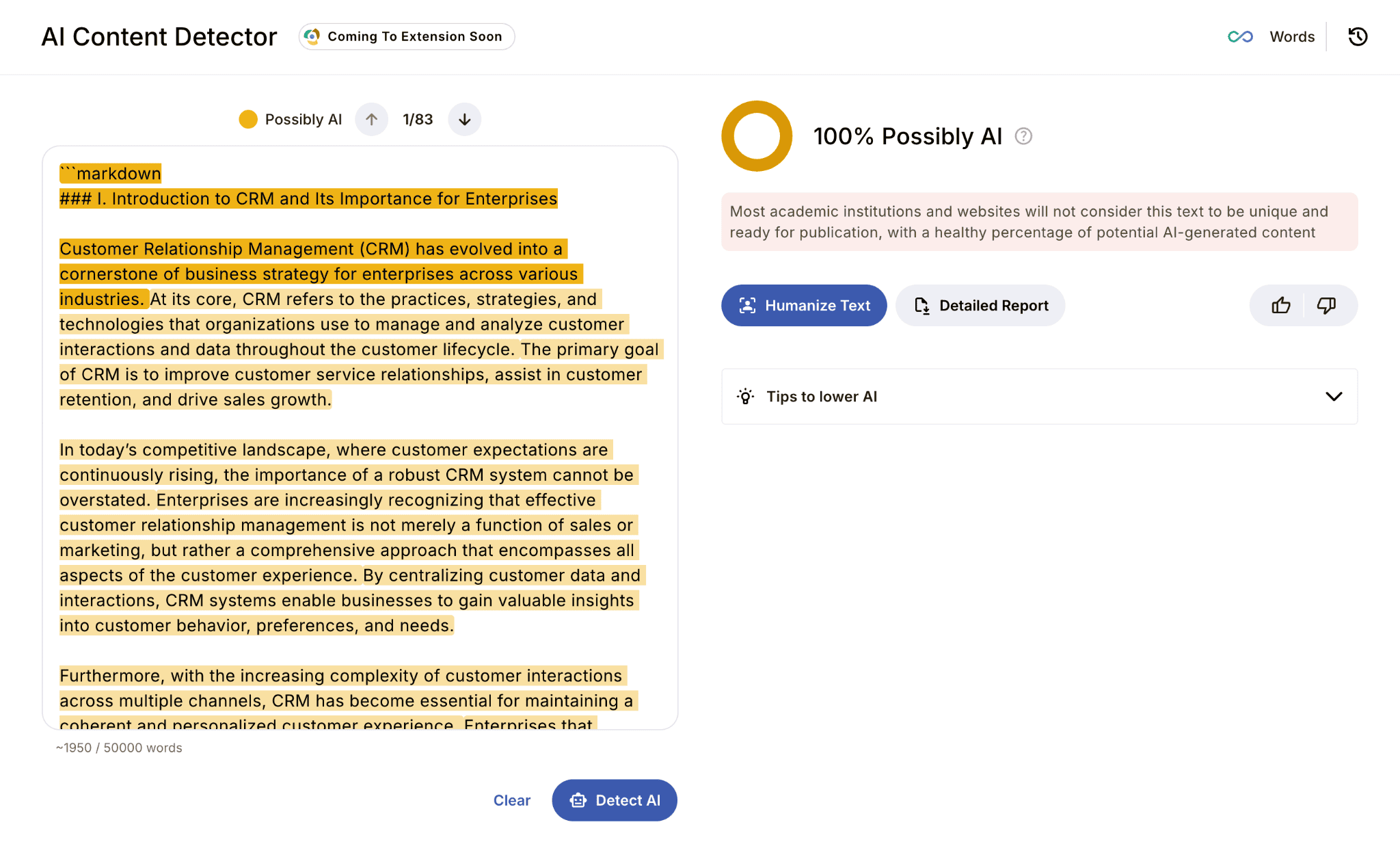
For example, let’s detect AI in the article about CRM for business enterprises we generated at the beginning. JustDone’s AI Detector demonstrates 100% AI score.
Running this text through JustDone’s AI Humanizer lowers the AI score twice from the very first try.
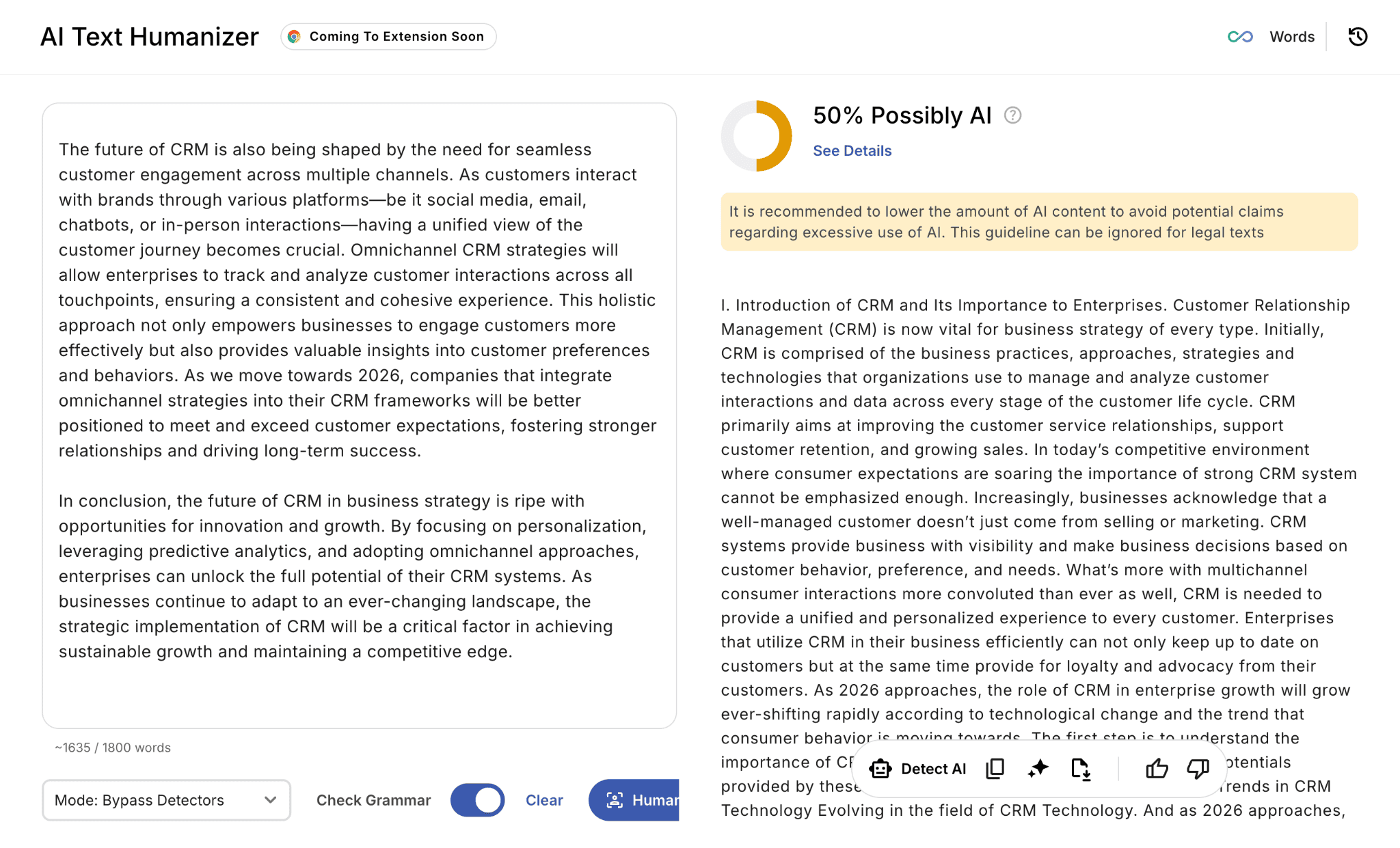
Also, with the help of JustDone AI Humanizer, you can select the tone that matches your audience better – from more official and formal to natural and casual.
Skip the Prompt Engineering with JustDone
These 26 prompts cover the full blog writing workflow — from finding ideas to generating visuals. But prompt engineering takes practice, and even well-crafted prompts require iteration, context-switching between tools, and manual assembly of the pieces into a finished post.
If you'd rather work inside a single tool that handles the entire workflow, JustDone is built for exactly that.
- From idea to draft in one place. JustDone's AI Article Writer takes your topic, audience, and tone and produces a structured, SEO-aware draft without requiring you to engineer a prompt for every stage. Tell it what you're writing and who you're writing for — it handles the outline, the sections, and the internal logic of the post. The Long Article Generator extends this to 1.200+ word posts, which is the length that actually ranks in competitive niches in 2026 — no stitching together multiple ChatGPT outputs manually.
- Research and ideation without the blank page. JustDone's AI Chat works like a research partner you can brief in plain language. Ask it to find angles on a topic, summarize what competitors are covering, suggest a content calendar for a specific niche, or explain a concept you want to simplify for your readers. Unlike a generic ChatGPT session, the context stays consistent across your conversation — so you're not re-explaining your audience and goals with every new message.
- Humanization built into the workflow. One of the most time-consuming steps after generating a draft is making it sound like you wrote it. JustDone's AI Humanizer is integrated directly into the platform — so instead of copying your draft into a separate tool, running a check, revising, and checking again, you do the whole thing in one window. The sentence-level breakdown shows you exactly which sections read as AI-generated and why, and the Humanizer rewrites them structurally rather than just swapping vocabulary.
- Quality checks before anything goes live. Grammar checking, AI detection, and plagiarism verification are all available in the same workspace. The typical workflow looks like this: generate a draft with the Article Writer, humanize flagged sections, run the grammar checker, verify the AI score one final time, and publish — without opening a single additional tab.
Try JustDone AI, if you need an all-in-one writing platform that works without complex prompts, has a full set of features at an affordable price.
Frequently Asked Questions
What are the best ChatGPT prompts for blog posts?
The most effective ChatGPT blog prompts are specific about audience, tone, keyword, length, and format. Generic prompts produce generic output. The prompts in this guide include placeholders for each variable so the output is tailored to your actual post rather than a hypothetical one.
Can ChatGPT write a full blog post?
Yes, ChatGPT can generate a complete blog post draft from a detailed prompt. The output works best as a starting point — you add specific examples, real data, and your brand voice to turn a competent draft into something worth reading and ranking.
How do I use ChatGPT for blog post ideas?
Use blog writing prompts that specify your niche, target audience, and strategic context — funnel stage, competitor gaps, or trending topics. Prompt 1 through 5 in this guide are built specifically for idea generation with strategic framing rather than just a list of titles.
How do I make ChatGPT blog content sound human?
Add specific details that only you could include — real examples, named sources, personal observations. Then run the draft through JustDone's AI Humanizer to address the structural patterns — uniform rhythm, formal connectors, predictable phrasing — that make AI output detectable even after manual editing.
Are ChatGPT blog prompts good for SEO?
Yes, when they're designed with SEO in mind. The outline and drafting prompts in this guide include keyword placement instructions. For deeper SEO optimization — meta descriptions, internal linking recommendations, keyword density — add a specific SEO refinement step after the initial draft is complete.
What is the 5 P's framework for AI prompting?
Persona, Purpose, Product or Topic, Prompt details, and Polish. This framework ensures every prompt gives ChatGPT the context it needs to produce useful output rather than a generic response. The most commonly skipped element is Prompt details — constraints on length, format, tone, and structure that shape the output significantly.
Final Thoughts on ChatGPT for Blog Posts
Writing a blog post that ranks in 2026 means producing content that is longer, more specific, and more useful than what's already on the first page — and doing it consistently enough to matter.
These 26 ChatGPT blog writing prompts give you a repeatable system for every stage of that process. Use the ideation prompts when you're stuck on what to write. Use the outline prompts to build structure before you draft. Use the intro and CTA prompts to make the parts that most writers rush through actually work. And use the drafting prompts to get from blank page to something worth editing in a fraction of the time it would take to write from scratch.
The prompts are a starting point, not a shortcut. The content that performs is always the version where a real person added real specifics — an example that only you could give, a data point you verified, a sentence that sounds like how you actually think about the topic. ChatGPT gets you 70% of the way there. The last 30% is what separates content that ranks from content that disappears.
If you want the whole workflow in one place — ideation, drafting, humanizing, and quality checks without switching between tools — JustDone AI platform is built for exactly that. Start with a topic. End with a post that's ready to publish.
